Plugin / Custom User Profile Photo
VincentListrani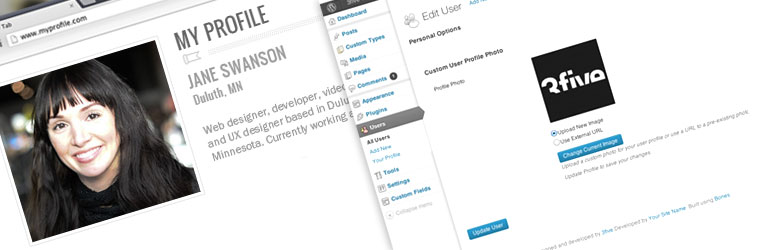
Description
Description
A more flexible way to attach and display a photo for a WordPress user profile.
Some users might not have or want to have a gravatar account or other universal avatar account. They simply may want to use a one-time specified photo to represent them on your WordPress site. This plugin solves that use case.
With the ability to upload a photo to a user profile via the WordPress Media Uploader or by specifying an external URL to an image, your users and/or authors can have a personalized photo specific to your website.*
This plugin will add a custom set of fields to the user profile page which will allow for the use of a custom profile photo.
You can add/change/edit uploaded photos directly from the user profile page. The external option allows you to provide a URL to the external image or remove it.
As of v0.4, the plugin now filters the get_avatar() function found in most WordPress themes.
Simply go to the users section and select a user or select “Your Profile” depending on your permission level. The new fields are added to the bottom of the user profile page. Choose which type of photo you want to use. Upload an image or add an external url. Then press the Update Profile button.
If you require a customized approach or your theme does not support the get_avatar() hook, use the example below.
To retrieve the photo on the front-end use the following example on your template page(s).
<?php
    // Retrieve The Post's Author ID
    $user_id = get_the_author_meta('ID');
    // Set the image size. Accepts all registered images sizes and array(int, int)
    $size = 'thumbnail';

    // Get the image URL using the author ID and image size params
    $imgURL = get_cupp_meta($user_id, $size);

    // Print the image on the page
    echo '<img src="'. $imgURL .'" alt="">';
?>
You will need to place the code above in each area of your theme where you wish to add and retrieve your theme’s custom avatar image. This can include but is not limited to single.php, page.php, and comments.php.
*Future Updates to this plugin include allowing other roles to access this feature, a settings page to allow a custom default image and other options.
Translations
- English – default, always included
- Dutch
- Hungarian
- Spanish
Credits
Thanks to Olaf Lederer, Harkály Gergő, sqhendr, SOMTIJDS, David Pérez


Get Started With Free Trial
Explore the offer details: Discover it now



Ratings
Rating breakdown
Details Information
Version
First Released
Total Downloads
Wordpress Version
Tested up to:
Require PHP Version:
Tags
Contributors
Languages
DIRECTORY DISCLAIMER
The information provided in this THEME/PLUGIN DIRECTORY is made available for information purposes only, and intended to serve as a resource to enable visitors to select a relevant theme or plugin. wpSocket gives no warranty of any kind, express or implied with regard to the information, including without limitation any warranty that the particular theme or plugin that you select is qualified on your situation.
The information in the individual theme or plugin displayed in the Directory is provided by the owners and contributors themselves. wpSocket gives no warranty as to the accuracy of the information and will not be liable to you for any loss or damage suffered by you as a consequence of your reliance on the information.
Links to respective sites are offered to assist in accessing additional information. The links may be outdated or broken. Connect to outside sites at your own risk. The Theme/Plugin Directory does not endorse the content or accuracy of any listing or external website.
While information is made available, no guarantee is given that the details provided are correct, complete or up-to-date.
wpSocket is not related to the theme or plugin, and also not responsible and expressly disclaims all liability for, damages of any kind, arising out of the use, reference to, or reliance on, any information or business listed throughout our site.