Plugin / HoweScape Unity3d WebGL
P.T.Howe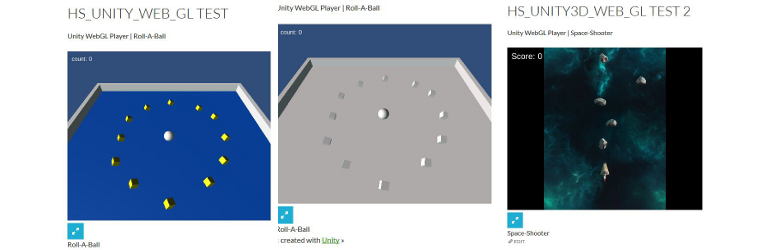
Description
Description
The Unity3d WebGL support creates a directory of files.
This is not convent to load on your WordPress web site.
This plugin takes the “Release” directory from your game and places it
inside the plugin. When compiling the output directory need to be “Builds_WebGL”.
This plugin can then be referenced from with a short code.
The parameters in the short code are the game name and the width and height.
ie. [hs_unity3d_web_gl_game src=”Roll-A-Ball” height=500 width=600]
To extend the support for Unity3d to version 5.5.1 an additional parameter has been added.
This parameter allows the specification of a version. The version support is 5.5.1 or the original version supported by the plugin. (ie. original version 5.3.1)
The Unity3d version 5.5.1. creates a directory “Development”. This is what I have uploaded in the included example. (ie. Roll-A-Ball-5_5_1-Release)
The short code is now looks like the following example.
ie. [hs_unity3d_web_gl_game src=”Roll-A-Ball” height=500 width=600 u3dver=5.5.1]
In reviewing the latest verion of Unity3d I noticed that the file organization for the WebGL has been updated again.
With this update there are now 3 supported version 5.3.1, 5.5.1 and 5.6.0. When using the newest version you would have a short code like the following.
ie. [hs_unity3d_web_gl_game src=Roll-A-Ball height=500 width=600 u3dver=5.6.0]
All other features should work as before. There are other features being considered please let me know if you desire anything functionality.
With the addition of the settings page it is now possible to place
the release directory in a zip file. (ie. <gamename>-Release.zip)
Once the file is uploaded the setting page for the plugin will allow extraction
of the files into a location which the short code can locate. When naming games from version 5.5.1 you will need
to include the version number. (ie. <gamename>-5_5_1-Release.zip) With this version place the
files from the Development directory in the zip file. For the latest verion it is the same. (ie. <gamename>-5_6_0-Release.zip)
In the process of doing the latest update I wanted to switch between the different games to verify that everything was working.
To make this task simpler I added a short code which displays a list of the available games and allows the selection of a game.
The major reason for the addition was game development. Since I thought it might be useful I have added it to the plugin.
ie. [hs_unity3d_web_gl_gamepage]
If you use this short code with just the plugin you will have three games. Two versions of the Roll-A-Ball sample game and the space-shooter sample game.
There are 2 ways games can be added one is making them part of the plugin. The second is as a zip file which gets uploaded to the media directory.
Once uploaded the uploaded game zip file can be expanded into the plugin from the settings page. There is also a delete option on the settings page.
It can remove any game. The page now displays the short code with the parameters you selected. The goal of this display is to assist people in getting a short
code which they can put on there page and display the game.
Most video games have a high score list. To support a high score list on your web site I have have added 2 short codes.
ie. [hs_unity3d_high_score] – on page to display scores
[hs_unity3d_addGameScore] – on page to add score
The first is a short code which displays a high score list which consists of the persons name, score, game name, Icon representing the platform.
The second is a short code which when placed on a page allows that page can accept updates. The page needs to be published so it can be located.
The updates are stored in a table in the database. An additional table
is created which contains the information on possible platforms ids and graphics.
Settings have been added to allow you to supply the page name which accepts
the game score. A second is the number of results to be displayed on a page. They URL will have the following general form
“http:///index.php//?name=tom&score=5656&game=9&security=123456”
The following information is returned. A HTML page with a table.
Arbitrary section
A brief Markdown Example
[hs_unity3d_web_gl_game src=”Roll-A-Ball” height=500 width=600]


Get Started With Free Trial
Explore the offer details: Discover it now



Ratings
Rating breakdown
Details Information
Version
First Released
Total Downloads
Wordpress Version
Tested up to:
Require PHP Version:
Tags
There is no tag found
Contributors
Languages
The plugin hasn't been transalated in any language other than English.
DIRECTORY DISCLAIMER
The information provided in this THEME/PLUGIN DIRECTORY is made available for information purposes only, and intended to serve as a resource to enable visitors to select a relevant theme or plugin. wpSocket gives no warranty of any kind, express or implied with regard to the information, including without limitation any warranty that the particular theme or plugin that you select is qualified on your situation.
The information in the individual theme or plugin displayed in the Directory is provided by the owners and contributors themselves. wpSocket gives no warranty as to the accuracy of the information and will not be liable to you for any loss or damage suffered by you as a consequence of your reliance on the information.
Links to respective sites are offered to assist in accessing additional information. The links may be outdated or broken. Connect to outside sites at your own risk. The Theme/Plugin Directory does not endorse the content or accuracy of any listing or external website.
While information is made available, no guarantee is given that the details provided are correct, complete or up-to-date.
wpSocket is not related to the theme or plugin, and also not responsible and expressly disclaims all liability for, damages of any kind, arising out of the use, reference to, or reliance on, any information or business listed throughout our site.