Plugin / Import users from CSV with meta
codection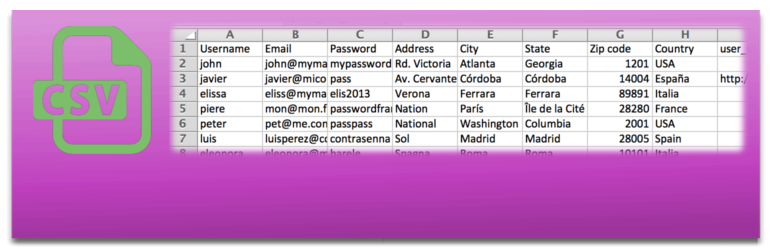
Description
Description
Clean and easy-to-use Import users plugin. It includes custom user meta to be included automatically from a CSV file and delimitation auto-detector. It also is able to send a mail to each user imported and all the meta data imported is ready to edit into user profile.
- Import CSV file with users directly to your WordPress
- Import thousends of users in only some seconds
- You can also import meta-data like data from WooCommerce customers using the correct meta_keys
- You can assign roles while importing
- Send a mail to every new user, this mails can be saved as templates and are fully customizable
- Use your own
- You can also update data of each user
- Assing a role
- Create a cron task to import users periodically
- Edit the metadata (you will be able to edit the metadata imported using metakeys directly in the profile of each user)
- Read our documentation
- Extend the plugin using the hooks we provide
- Ask anything in support forum, we try to give the best support
Moreover this plugin is compatible with:
- WooCommerce: to import the customer data
- WooCommerce Membership: to import memberships
- BuddyPress: to import custom BuddyPress fields, groups and roles
- Paid Membership Pro: to import memberships
- Indeed Ultimate Membership Pro: to import memberships
- Allow Multiple Accounts: plugin will allow the same rules importing than this plugin
- Groups: to assign users to groups while importing
- New User Approve: you can import users and approbe/wait for approve them
- Users Group: to assign users to groups while importing
- WP LMS Course: to enroll users in the courses while importing
- WP Members: to import memberships
- WP Users Group: to assign users to groups while importing
In Codection we have more plugins, please take a look to them.
- RedSys Gateway for WooCommerce Pro a plugin to connect your WooCommerce to RedSys (premium)
- Ceca Gateway for WooCommerce Pro a plugin to connect your WooCommerce to Ceca (premium)
- BBVA Bancomer for WooCommerce Pro a plugin to connect your WooCommerce to BBVA Bancomer (premium)
- RedSys Button for WordPress a plugin to receive payments using RedSys in WordPress without using WooCommerce (premium)
- RedSys Gateway for Contact Form 7 a plugin to receive payments using RedSys in WordPress using the popular contact plugin Contact Form 7 (premium)
- Ceca Gateway for Contact Form 7 a plugin to receive payments using Ceca in WordPress using the popular contact plugin Contact Form 7 (premium)
- RedSys Gateway for WP Booking Calendar Pro a plugin to receive payments using RedSys in WordPress using WP Booking Calendar Pro (premium)
- RedSys Gateway for Goodlayers Tourmaster Pro a plugin to receive payments using RedSys in WordPress using Goodlayers Tourmaster Pro (premium)
- Clean Login a plugin to create your own register, log in, lost password and update profile forms (free)
Basics
- Import users from a CSV easily
- And also extra profile information with the user meta data (included in the CSV with your custom fields)
- Just upload the CSV file (one included as example)
- All your users will be created/updated with the updated information, and of course including the user meta
- Autodetect delimiter compatible with
comma ,,semicolon ;andbar |
Usage
Once the plugin is installed you can use it. Go to Tools menu and there, there will be a section called Insert users from CSV. Just choose your CSV file and go!
CSV generation
You can generate CSV file with all users inside it, using a standar spreadsheet software like: Microsoft Excel, LibreOffice Calc, OpenOffice Calc or Gnumeric.
You have to create the file filled with information (or take it from another database) and you will only have to choose CSV file when you “Save as…” the file. As example, a CSV file is included with the plugin.
Some considerations
Plugin will automatically detect:
- Charset and set it to UTF-8 to prevent problems with non-ASCII characters.
- It also will auto detect line-ending to prevent problems with different OS.
- Finally, it will detect the delimiter being used in CSV file


Get Started With Free Trial
Explore the offer details: Discover it now



Ratings
Rating breakdown
Details Information
Version
First Released
Total Downloads
Wordpress Version
Tested up to:
Require PHP Version:
Tags
Contributors
Languages
DIRECTORY DISCLAIMER
The information provided in this THEME/PLUGIN DIRECTORY is made available for information purposes only, and intended to serve as a resource to enable visitors to select a relevant theme or plugin. wpSocket gives no warranty of any kind, express or implied with regard to the information, including without limitation any warranty that the particular theme or plugin that you select is qualified on your situation.
The information in the individual theme or plugin displayed in the Directory is provided by the owners and contributors themselves. wpSocket gives no warranty as to the accuracy of the information and will not be liable to you for any loss or damage suffered by you as a consequence of your reliance on the information.
Links to respective sites are offered to assist in accessing additional information. The links may be outdated or broken. Connect to outside sites at your own risk. The Theme/Plugin Directory does not endorse the content or accuracy of any listing or external website.
While information is made available, no guarantee is given that the details provided are correct, complete or up-to-date.
wpSocket is not related to the theme or plugin, and also not responsible and expressly disclaims all liability for, damages of any kind, arising out of the use, reference to, or reliance on, any information or business listed throughout our site.