Plugin / Jquery Validation For Contact Form 7
Dinesh Karki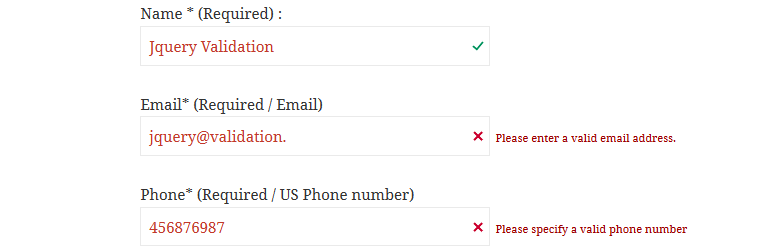
Description
Description
This plugin adds jquery validation to your contact form 7. You will be able to validate extra validation rules like: url, date, credit card, phone number in the contact form 7 fields.
Benefits you get from this plugins.
- Adds Jquery Validation to Contact Form Fields.
- More faster validation than of contact form core validation.
- Allows field to be validated for url, date, credit card, number and more.
- Field Highlight features for invalid field data types.
- Error message for individual fields.
- Easy to to add validation rules. Just add class in contact form 7 fields.
- Interactive validation that your users love.
- Works with multiple forms now.
Validation Methods available in lite version.
- Required
- Url
- Date
- Number
- Digit only
- Credit Card
- US Phone number
- Letters Only
- IBAN (International Bank account number)
Documentation
How To Use | Validation Methods
Additional Validation Methods available in PRO version.
- Custom Code Validation
- Alpha Numeric – Letters, numbers, and underscores only
- Bank or Giro account number.
- BIC Code – Accepts Valid BIC Code Only.
- Giro Account – Accepts Giro Account number only.
- Integer – Accepts positive or negative non-decimal number.
- IPv4 / IPv6 – Accepts IPv4/IPv6 IP address only.
- Mobile UK – Accepts UK Mobile number only.
- Phone UK – Accepts UK phone number only.
- US State – Accpets US state only.
- Minimum Number – Makes the element require a given minimum.
- Maximum Number – Makes the element require a given maximum.
- Minimum Length – Makes the element require a given minimum length.
- Maximum Length – Makes the element require a given maximum length.
- Range Length – Makes the element require a given value range.
- Range – Makes the element require a given value range.
- Equal To – Requires the element to be the same as another one
- Extension – Makes the element require a certain file extension
- Require Group – Ensures a given number of fields in a group are complete.
Additional Features in Pro version.
- 4 different validation error theme to choose from.
- Change validation error message.
For Support Please Visit http://dineshkarki.com.np/forums/forum/jquery-validation-for-contact-form. We don’t respond to tickets created here.
Don’t forget to check the instructions in the setting page of the plugin.


Get Started With Free Trial
Explore the offer details: Discover it now



Ratings
Rating breakdown
Details Information
Version
First Released
Total Downloads
Wordpress Version
Tested up to:
Require PHP Version:
Tags
Contributors
Languages
The plugin hasn't been transalated in any language other than English.
DIRECTORY DISCLAIMER
The information provided in this THEME/PLUGIN DIRECTORY is made available for information purposes only, and intended to serve as a resource to enable visitors to select a relevant theme or plugin. wpSocket gives no warranty of any kind, express or implied with regard to the information, including without limitation any warranty that the particular theme or plugin that you select is qualified on your situation.
The information in the individual theme or plugin displayed in the Directory is provided by the owners and contributors themselves. wpSocket gives no warranty as to the accuracy of the information and will not be liable to you for any loss or damage suffered by you as a consequence of your reliance on the information.
Links to respective sites are offered to assist in accessing additional information. The links may be outdated or broken. Connect to outside sites at your own risk. The Theme/Plugin Directory does not endorse the content or accuracy of any listing or external website.
While information is made available, no guarantee is given that the details provided are correct, complete or up-to-date.
wpSocket is not related to the theme or plugin, and also not responsible and expressly disclaims all liability for, damages of any kind, arising out of the use, reference to, or reliance on, any information or business listed throughout our site.