Plugin / JQuery Accordion Menu Widget
Lee Chestnutt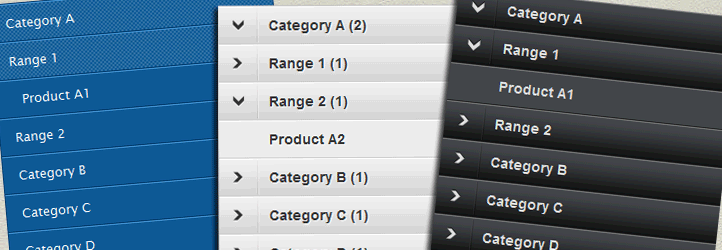
Description
Description
Creates vertical accordion menus from any WordPress custom menu using jQuery. Add menus using either widgets or shortcodes. Features include – handles multiple levels, saved state using cookies, add count of number of links and option of selecting “click” or “hover” events for triggering the menu.
The plugin has several parameters that can be configured to help cutomise the vertical accordion menu. These can either be set via the widget control panel or by passing parameters in a shortcode:
Widget Options for Menu
The plugin has several parameters that can be configured to help cutomise the vertical accordion menu:
- Click/Hover – Selects the event type that will trigger the menu to open/close
- Auto-close open menus – If checked this will allow only one menu item to be expanded at any time. Clicking on a new menu item will automatically close the previous one.
- Save menu state (uses cookies) – Selecting this will allow the menu to remember its open/close state when browsing to a new page.
- Auto Expand Based on Current Page/Item – If checked, this option will automatically expand sub-menus based on the current page/post based on the inherent WordPress custom menu css classes – e.g. select this option if you would like the menu to automatically expand when the user clicks a link other than the accordion menu.
- Disable parent links – If selected, any menu items that have child elements will have their links disabled and will only open/close their relevant sub-menus. Do not select this if you want the user to still be able to browse to that item’s page.
- Close menu (hover only) – If checked the menu will automatically fully close after 1 second when the mouse moves off the menu – only available if event type is “hover”
- Show Count – If checked the menu will automatically add a count showing the number of links under each parent menu item
- Class Menu – Set the CSS class of the WordPress menu. If blank the default class “menu” will be used
- Class Disable – Input the CSS class for parent menu items that should be disabled – i.e. the child sub-menu remains open
- Hover delay – This setting adds a delay to the hover event to help prevent the menu opening/closing accidentally. A higher number means the cursor must stop moving for longer before the menu action will trigger
- Animation Speed – The speed at which the menu will open/close
- Skin – Several sample skins are available to give examples of css that can be used to style your accordion menu
Note: care should be taken when selecting the hover event as this may impact useability – adding a hover delay and reducing the animation speed may help reduce problems with useability
Using Shortcodes
The minimum requirement to use a shortcode is to include the name of the menu that you want to use for the accordion – the name must match one of the menus created in the WordPress menu admin page. To add a menu using shortcodes use the following code:
[dcwp-jquery-accordion menu=”Test Menu”]
Optional shortcode parameters for customising the menu (refer to widget settings above for information):
event – click/hover (default = click)
auto_close – true/false (default = false)
save – true/false (default = false)
expand – true/false (default = false)
disable – true/false (default = false)
close – true/false (default = false)
count – true/false (default = false)
menu_class – optional (default = menu)
disable_class – optional (no default)
hover – 600
animation – slow/normal/fast (default = slow)
skin – black/blue/clean/demo/graphite/grey (default = No Theme)
For more information please check out the plugin home page:


Get Started With Free Trial
Explore the offer details: Discover it now



Ratings
Rating breakdown
Details Information
DIRECTORY DISCLAIMER
The information provided in this THEME/PLUGIN DIRECTORY is made available for information purposes only, and intended to serve as a resource to enable visitors to select a relevant theme or plugin. wpSocket gives no warranty of any kind, express or implied with regard to the information, including without limitation any warranty that the particular theme or plugin that you select is qualified on your situation.
The information in the individual theme or plugin displayed in the Directory is provided by the owners and contributors themselves. wpSocket gives no warranty as to the accuracy of the information and will not be liable to you for any loss or damage suffered by you as a consequence of your reliance on the information.
Links to respective sites are offered to assist in accessing additional information. The links may be outdated or broken. Connect to outside sites at your own risk. The Theme/Plugin Directory does not endorse the content or accuracy of any listing or external website.
While information is made available, no guarantee is given that the details provided are correct, complete or up-to-date.
wpSocket is not related to the theme or plugin, and also not responsible and expressly disclaims all liability for, damages of any kind, arising out of the use, reference to, or reliance on, any information or business listed throughout our site.