Plugin / Menu Social Icons
Paul Clark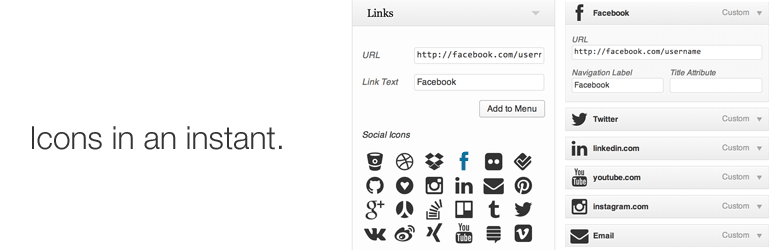
Description
Description
This plugin changes social website links in any of your WordPress menus to use icons from FontAwesome.
No configuration is necessary, other having links to your social media profiles in the built-in WordPress menus. Add links to any of these social sites under Appearance > Menus, then enable the plugin.
Supported Sites
bitbucket.org           dribbble.com         dropbox.com
facebook.com            flickr.com           foursquare.com
github.com              gittip.com           instagram.com
linkedin.com            mailto:(email)       pinterest.com
plus.google.com         renren.com           *slideshare.net
stackoverflow.com       *stackexchange.com   trello.com
tumblr.com              twitter.com          *vimeo.com
vk.com                  weibo.com            xing.com
youtube.com

* Requires storm_social_icons_use_latest be turned on. (See below.)
Changing Icon Appearance
If you want to edit the appearance of the icons in ways that the options below don’t provide, you can do more with custom CSS to match your theme. This video walks through the process:
Option: Add Vimeo and Stack Exchange
To use FontAwesome 4.0+, which drops support for IE7, but adds vimeo.com and stackexchange.com, add this to your theme’s functions.php file:
add_filter( ‘storm_social_icons_use_latest’, ‘__return_true’ );
Option: Show Text
To show menu item text in addition to the icons, add this to your theme’s functions.php file:
add_filter( ‘storm_social_icons_hide_text’, ‘__return_false’ );
Option: Alternate Icons
To show an alternative icon style, where logos are cut out of signs, , add this to your theme’s functions.php file:
add_filter( ‘storm_social_icons_type’, create_function( ”, ‘return “icon-sign”;’ ) );
Option: Icon Sizes
To vary icon sizes, add this to your theme’s functions.php file: (Default is 2x)
add_filter( 'storm_social_icons_size', create_function( '', 'return "normal";' ) );
add_filter( 'storm_social_icons_size', create_function( '', 'return "large";' ) );
add_filter( 'storm_social_icons_size', create_function( '', 'return "2x";' ) );
add_filter( 'storm_social_icons_size', create_function( '', 'return "3x";' ) );
add_filter( 'storm_social_icons_size', create_function( '', 'return "4x";' ) );
Option: Add More Icons
Add icons from FontAwesome for other URLs. For example, an RSS feed:
add_filter( 'storm_social_icons_networks', 'storm_social_icons_networks');
function storm_social_icons_networks( $networks ) {

    $extra_icons = array (
        '/feed' => array(                  // Enable this icon for any URL containing this text
            'name' => 'RSS',               // Default menu item label
            'class' => 'rss',              // Custom class
            'icon' => 'icon-rss',          // FontAwesome class
            'icon-sign' => 'icon-rss-sign' // May not be available. Check FontAwesome.
        ),
    );

    $extra_icons = array_merge( $networks, $extra_icons );
    return $extra_icons;

}
Option: Change HTML Output
This is useful for developers using the plugin with custom icon sets.
Edit icon HTML output:
add_filter( 'storm_social_icons_icon_html', 'storm_social_icons_icon_html', 10, 4 );

function storm_social_icons_icon_html( $html, $size, $icon, $show_text ) {
    $html = "<i class='$size $icon $show_text'></i>";
    return $html;
}
Edit title HTML output:
add_filter( 'storm_social_icons_title_html', 'storm_social_icons_title_html', 10, 2 );

function storm_social_icons_title_html( $html, $title ){
    $html = "<span class='fa-hidden'>$title</span>";
    return $html;
}
Edit all link attributes (WordPress core filter):
add_filter( 'wp_nav_menu_objects', 'storm_wp_nav_menu_objects', 7, 2 );

function storm_wp_nav_menu_objects( $sorted_menu_items, $args ){

    foreach( $sorted_menu_items as &$item ) {

        if ( 0 != $item->menu_item_parent ) {
            // Skip submenu items
            continue;
        }

        // Only apply changes to links containing this text.
        $search_url = 'facebook.com';

        if ( false !== strpos( $item->url, $search_url ) ) {

            // Add a custom class
            $item->classes[] = 'some-custom-class';

            // Add custom HTML inside the link
            $item->title = '<strong>custom html</strong>' . $item->title;

        }
    }

    return $sorted_menu_items;

}


Get Started With Free Trial
Explore the offer details: Discover it now



Ratings
Rating breakdown
Details Information
Version
First Released
Total Downloads
Wordpress Version
Tested up to:
Require PHP Version:
Tags
Contributors
Languages
The plugin hasn't been transalated in any language other than English.
DIRECTORY DISCLAIMER
The information provided in this THEME/PLUGIN DIRECTORY is made available for information purposes only, and intended to serve as a resource to enable visitors to select a relevant theme or plugin. wpSocket gives no warranty of any kind, express or implied with regard to the information, including without limitation any warranty that the particular theme or plugin that you select is qualified on your situation.
The information in the individual theme or plugin displayed in the Directory is provided by the owners and contributors themselves. wpSocket gives no warranty as to the accuracy of the information and will not be liable to you for any loss or damage suffered by you as a consequence of your reliance on the information.
Links to respective sites are offered to assist in accessing additional information. The links may be outdated or broken. Connect to outside sites at your own risk. The Theme/Plugin Directory does not endorse the content or accuracy of any listing or external website.
While information is made available, no guarantee is given that the details provided are correct, complete or up-to-date.
wpSocket is not related to the theme or plugin, and also not responsible and expressly disclaims all liability for, damages of any kind, arising out of the use, reference to, or reliance on, any information or business listed throughout our site.