Plugin / Microthemer Lite
Themeover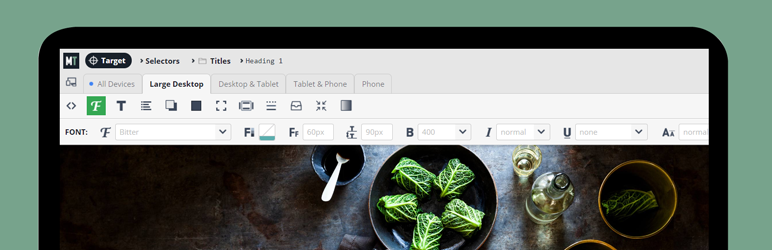
Description
Description
Microthemer is a light-weight yet powerful CSS editor for responsively customizing the appearance of any WordPress theme or plugin content (e.g. contact forms), down to the smallest detail. Microthemer caters for both coders and non-coders.
Main Features (for all users)
- Style anything on your web page, including headers, menus, sidebars footers, and plugin content.
- Intuitive visual editing.
- Over 100 style options at your disposal e.g. Google Web Fonts, background color, font-family, CSS3 gradients, drop shadow etc. Pro-only styles include animation, transition, and flexbox.
- Design responsively without the usual headaches. Preview your site at different screen sizes and apply media queries styles without writing code.
- Export your designs as a zip file. For sharing with friends, or transferring between domains.
- In-program docs so you can learn about CSS, or refresh your memory.
- History feature, so you can go back if you make a mistake.
- Draft mode, so you can try new designs on a live site without affecting what visitors see until you’re ready to publish.
- Apply styles per-page or globally.
- Apply :hover states an any other pseudo selector like :nth-child() without having to remember the syntax.
- Advanced color picker for sampling colors from your theme and creating custom palettes.
- Import CSS media queries, selectors, and styles from any stylesheet into Microthemer’s GUI.
- Light-weight. Microthemer generates CSS. It doesn’t try to do much more than that.
- Nonce security to help keep things secure.
- Supports multi-site.
- Supports SSL sites.
- Great support provided via our dedicated Microthemer forum.
- Free CSS, HTML, and responsive design tutorial.
- Event-based animation (e.g. onClick, inView)
Main Features for developers
- Full code editor that lets you write code in the browser while looking at the page.
- Hybrid GUI code editor if you want to leverage the power of the GUI but prefer writing CSS properties and values by hand.
- SCSS, CSS, and JS supported.
- Enqueue JS libraries native to WordPress like jQuery UI for rapid experimentation.
- Minify CSS code.
- HTML and CSS inspection, similar to browser inspectors.
- Keyboard shortcuts for common actions.
- Validation of custom selectors with visual feedback as you type.
- Hide from clients by uninstalling or deactivating, but still use the CSS Microthemer generates by copying and pasting a few lines of PHP code to your theme’s functions.php file.
Free VS Premium version
This free version limits you styling 15 things, and doesn’t include flexbox, transition, or animation features. To unlock the full program, you can purchase a Standard ($45) or Developer ($90) license.
Getting started video
Using Microthemer with Beaver Builder
Learn flexbox with Microthemer in 14 mins


Get Started With Free Trial
Explore the offer details: Discover it now



Ratings
Rating breakdown
Details Information
Version
First Released
Total Downloads
Wordpress Version
Tested up to:
Require PHP Version:
Tags
Contributors
Languages
DIRECTORY DISCLAIMER
The information provided in this THEME/PLUGIN DIRECTORY is made available for information purposes only, and intended to serve as a resource to enable visitors to select a relevant theme or plugin. wpSocket gives no warranty of any kind, express or implied with regard to the information, including without limitation any warranty that the particular theme or plugin that you select is qualified on your situation.
The information in the individual theme or plugin displayed in the Directory is provided by the owners and contributors themselves. wpSocket gives no warranty as to the accuracy of the information and will not be liable to you for any loss or damage suffered by you as a consequence of your reliance on the information.
Links to respective sites are offered to assist in accessing additional information. The links may be outdated or broken. Connect to outside sites at your own risk. The Theme/Plugin Directory does not endorse the content or accuracy of any listing or external website.
While information is made available, no guarantee is given that the details provided are correct, complete or up-to-date.
wpSocket is not related to the theme or plugin, and also not responsible and expressly disclaims all liability for, damages of any kind, arising out of the use, reference to, or reliance on, any information or business listed throughout our site.