Plugin / Molongui Order Bump For WooCommerce
Amitzy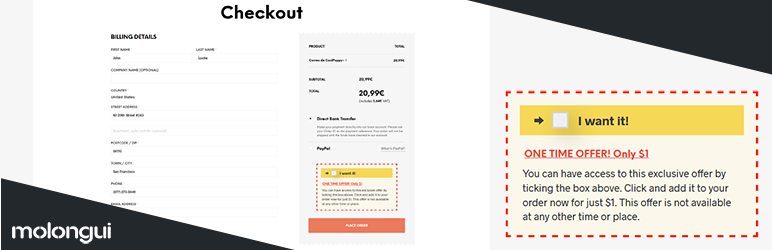
Description
Description
Increase your revenue by displaying one-time offers on your Checkout page, which a customer can purchase by accepting them without leaving the order form.
By choosing an offer that matches the product and a price point that makes it nearly impossible to say no, you’ll have a winning combination to increase your revenue.
Using Molongui Order Bump For WooCommerce, you will enjoy:
- Increased Average Order Value – Adding easily accessible additional product offerings on the Checkout page stimulates customers to buy more, raising the value of the order.
- Greater Engagement – Allows you to showcase more products to a potential customer base, increasing customer engagement with the brand.
- Smoother Shopping Experience – Customers won’t have to go through the entire check-out process again… With just ONE click, Molongui Order Bump can add any upsell to their purchase!
Features
- Display an Order Bump on your Checkout page.
- Eye-catching style to grab clients attention.
- Selectable product to offer.
- Configurable discounted price.
- Configurable texts to display within the bump.
- Live preview on Order Bump edit screen.
- Responsive design, mobile ready layout.
- WooCommerce compatible.
Need more? Would you like to fully customize the bump box to make it match your theme design or likings? Do you need to display more than just one bump? Need to display the bump in your Cart page or at any other position on your Checkout page? Might be interested in configuring or scheduling when to display the bump?
Look no more. Molongui Order Bump Premium is what you need. Check extended features below:
Premium features
- All the standard features mentioned above.
- Fully Customizable Styles: colors, spacing, line styles, arrow icon, border width…
- Ability to make the arrow on the bump blink to catch client attention.
- Ability to add an image into the bump, just below the text or instead of it.
- Multiple Order Bumps: Create as many as needed, display more than one on the same page.
- Automatic addition: Add the offer to your client’s Cart. No client action needed!
- Conditional display based on Cart contents and value.
- Conditional display based on a date schedule.
- Conditional display based on Cart products.
- Conditional display based on Cart categories.
- Configurable display conditions criteria.
- Configurable display page: Checkout, Cart or on both.
- Configurable display location: above/below customer details, above/below Cart, above/below order details…
- Accepts third-party shortcodes. Display whatever within the Order Bump.
- Premium support and assistance.
Get Molongui Order Bump Premium here.
Internationalization
This plugin has been translated to the following languages on a best effort basis. Would you like to translate this plugin into your language? Please, let us know!
- English (100%)
- Spanish (100%)


Get Started With Free Trial
Explore the offer details: Discover it now



Ratings
Rating breakdown
Details Information
Version
First Released
Total Downloads
Wordpress Version
Tested up to:
Require PHP Version:
Tags
Contributors
Languages
DIRECTORY DISCLAIMER
The information provided in this THEME/PLUGIN DIRECTORY is made available for information purposes only, and intended to serve as a resource to enable visitors to select a relevant theme or plugin. wpSocket gives no warranty of any kind, express or implied with regard to the information, including without limitation any warranty that the particular theme or plugin that you select is qualified on your situation.
The information in the individual theme or plugin displayed in the Directory is provided by the owners and contributors themselves. wpSocket gives no warranty as to the accuracy of the information and will not be liable to you for any loss or damage suffered by you as a consequence of your reliance on the information.
Links to respective sites are offered to assist in accessing additional information. The links may be outdated or broken. Connect to outside sites at your own risk. The Theme/Plugin Directory does not endorse the content or accuracy of any listing or external website.
While information is made available, no guarantee is given that the details provided are correct, complete or up-to-date.
wpSocket is not related to the theme or plugin, and also not responsible and expressly disclaims all liability for, damages of any kind, arising out of the use, reference to, or reliance on, any information or business listed throughout our site.