Plugin / Podcast Player
vedathemes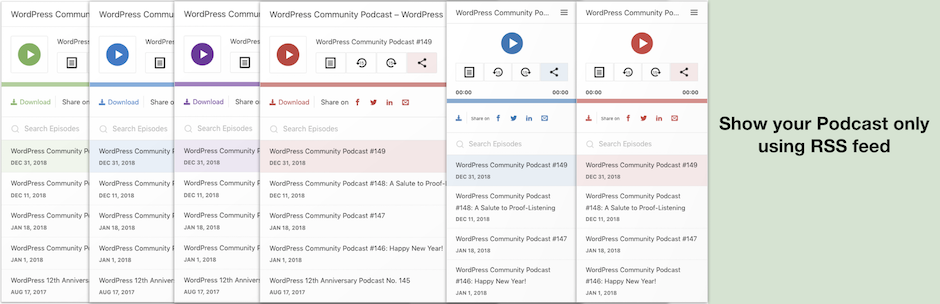
Description
Description
An easy way to show and play your podcast episodes using podcasting feed url. It is a must have plugin for your podcast website. Give your listeners an easy access to all your episodes from any page or even from all the pages of your website.
Podcast player key features
- Give your listeners an easy access to your podcast episodes.
- Display responsive podcast player just by entering your podcast’s feed url.
- Fetch all required details from feed url.
- Option to modify fetched details of your podcast.
- Option to Show or Hide individual player elements.
- Give your listener an option to share your podcast episodes.
- Ajax live search episodes from the podcast.
- It is possible to have multiple instances of podcast player on single page.
- Self adjusting layout according to width of the podcast player.
Setup Podcast Player Widget
Display searchable podcast episodes list on any widget area of your website.
Minimum Setup
- After activating the plugin, visit Appearance > Widgets in admin dashboard.
- Look for ‘Podcast player’ widget in left ‘Available Widgets’ section.
- Drag the widget to any available sidebar/widget area.
- Enter feed url in the appropriate field.
- Click [Save] button.
Advanced Setup
- After activating the plugin, visit Appearance > Widgets in admin dashboard.
- Look for ‘Podcast player’ widget in left ‘Available Widgets’ section.
- Drag the widget to any available sidebar/widget area.
- Enter feed url in the appropriate field.
- Optionally, click on “Change podcast content” button to customize feed’s auto fetched details.
- Optionally, click on “Show/Hide player items” button to show or hide player elements.
- Optionally, click on “Podcast player styling” button to customize player’s accent color.
- Optionally, click on “Sort & Filter” button to sort or filter podcast episodes.
- Click [Save] button.
Setup Podcast Player Block
Display searchable podcast episodes list on any post or page. Make sure you have not disabled WordPress latest block editor.
Setup
- After activating the plugin, visit any post or page’s edit screen.
- In main content area, click on ‘+’ icon to add a new block.
- Search for ‘Podcast Player’ block.
- Enter feed url in the appropriate field. A preview of your podcast player will appear.
- Click on the podcast player preview.
- Select appropriate options from the right sidebar to customize the player.
- Save or Update the post.
Setup Podcast Player using shortcode
Minimum Setup
[podcastplayer feed_url ='']
- feed_url – Your podcast feed url.
Advanced Setup
[podcastplayer feed_url ='' number='' podcast_menu='' cover_image_url='' hide_cover='true' hide_description='true' hide_subscribe='true' hide_search='true' hide_loadmore='true' hide_download='true' accent_color='#FFFFFF']Short Description [/podcastplayer]
- feed_url: Your podcast feed url.
- number: Number of podcasts episodes to be displayed at a time.
- podcast_menu: Any previously created WordPress menu’s name OR ID OR slug. (optional)
- cover_image_url: Podcast’s cover image url. The image must be from your WP media library. (optional)
- header_default: (false/true) Show player header items by default
- hide_title: (false/true) Show / Hide podcast Title in header info section
- hide_cover: (false/true) Show / Hide podcast cover image
- hide_description: (false/true) Show / Hide podcast description
- hide_subscribe: (false/true) Show / Hide podcast subscribe button.
- hide_search: (false/true) Show / Hide podcast search field.
- hide_author: (false/true) Show / Hide author/podcaster’s name.
- hide_content: (false/true) Show / Hide podcast episode’s content.
- hide_loadmore: (false/true) Show / Hide podcast load more button.
- hide_download: (false/true) Show/ Hide podcast episode download link.
- hide_social: (false/true) Show/ Hide podcast episode social sharing links.
- accent_color: Podcast player’s accent color (Color hex-code to be entered).
- sortby: Sort podcast episodes (sort_date_desc/sort_date_asc/sort_title_desc/sort_title_asc)
- filterby: Filter by any string in episode’s title
- Short Description: Podcast short text description. (optional)
Depricated Shortcode Options (No longer available)
- skin: dark or light player skin
- no_excerpt: Podcast description excerpt or full content.


Get Started With Free Trial
Explore the offer details: Discover it now



Ratings
Rating breakdown
Details Information
Version
First Released
Total Downloads
Wordpress Version
Tested up to:
Require PHP Version:
Tags
Contributors
Languages
The plugin hasn't been transalated in any language other than English.
DIRECTORY DISCLAIMER
The information provided in this THEME/PLUGIN DIRECTORY is made available for information purposes only, and intended to serve as a resource to enable visitors to select a relevant theme or plugin. wpSocket gives no warranty of any kind, express or implied with regard to the information, including without limitation any warranty that the particular theme or plugin that you select is qualified on your situation.
The information in the individual theme or plugin displayed in the Directory is provided by the owners and contributors themselves. wpSocket gives no warranty as to the accuracy of the information and will not be liable to you for any loss or damage suffered by you as a consequence of your reliance on the information.
Links to respective sites are offered to assist in accessing additional information. The links may be outdated or broken. Connect to outside sites at your own risk. The Theme/Plugin Directory does not endorse the content or accuracy of any listing or external website.
While information is made available, no guarantee is given that the details provided are correct, complete or up-to-date.
wpSocket is not related to the theme or plugin, and also not responsible and expressly disclaims all liability for, damages of any kind, arising out of the use, reference to, or reliance on, any information or business listed throughout our site.