Plugin / Post SMTP Mailer/Email Log
Yehuda Hassine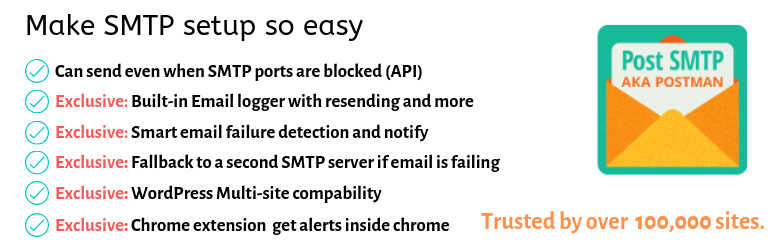
Description
Description
Version 2.0.6 released – bug fixes.
The Only SMTP plugin with chrome Notifications
Get notified if your emails are failing inside your Chrome browser. Download here
WordPress Mail SMTP Plugin
Postman SMTP is back!
No need to search for another SMTP plugin anymore.
Post SMTP is a next-generation WP Mail SMTP plugin, that assists in the delivery of email generated by your WordPress site. Post SMTP is the first and only plugin to support the latest security standards. With OAuth 2.0, there is no need to store your email passsword in the WordPress database where it might be found.
The Connectivity Test and intelligent Setup Wizard scan your SMTP server to detect firewall blocks and eliminate configuration mistakes. The built-in Email Log is an invaluable resource for diagnosing problems with emails. Even hosts that block the standard SMTP ports, like GoDaddy or Bluehost, can’t stop your email as Post SMTP can deliver via HTTPS if it can’t use SMTP.
Post SMTP is not another WP Mail SMTP clone like WP Bank or Easy SMTP. It replaces the default WordPress SMTP library, PHPMailer, with the heavy-duty Zend_Mail. Never lose an email to PHP mail() again.
The Most Fast And Easy
See how fast and easy to setup Post SMTP with Google/Gsuite or any SMTP service.
Standard Features
- Easy-to-use, powerful Setup Wizard for perfect configuration
- Commercial-grade Connectivity Tester to diagnose server issues
- Log and resend all emails; see the exact cause of failed emails
- Supports International alphabets, HTML Mail and MultiPart/Alternative
- Supports forced recipients (cc, bcc, to) and custom email headers
- SASL Support: Plain/Login/CRAM-MD5/XOAUTH2 authentication
- Security Support: SMTPS and STARTTLS (SSL/TLS)
- Copy configuration to other instances of Post
OAuth 2.0 Features
- Supports the proprietary OAuth 2.0 implementations of Gmail, Hotmail and Yahoo
- Fire-and-forget delivery continues even if your password changes
- Gmail: By combining OAuth2 and the Gmail API, Post can deliver where other plugins can not
API (HTTPS) Email Support
-
Gmail API for sending Gmail and Google Apps email (requires a Google account)
Often bloggers and small business owners don’t want to use third-party SMTP services. Well you can use your Gmail or G Suite account for SMTP emails.
Check the guide I wrote -
Mandrill API for sending any email (requires a Mandrill account)
Mandrill is an email infrastructure service offered as an add-on for MailChimp that you can use to send personalized, one-to-one e-commerce emails, or automated transactional emails. -
Mailgun API for sending any email (requires a Mailgun account)
Mailgun SMTP is a popular SMTP service provider that allows you to send large quantities of emails. They allow you to send your first 10,000 emails for free every month. -
SendGrid API for sending any email (requires a SendGrid account and PHP 5.3)
SendGrid has a free SMTP plan that you can use to send up to 100 emails per day. With our native SendGrid SMTP integration, you can easily and securely set up SendGrid SMTP on your WordPress site.
Post SMTP needs translators! If you are a non-English speaker, please get involved!
Compatibile With..
- Woocommerce
- WPForms
- Elementor Forms
- Contact Form 7
- Gravity Forms
- Fast Secure Contact Form
- Visual Forms Builder
- Contact Form Builder
- PlanSo Forms
- Quform
- MyMail Newsletter by revaxarts
- SendPress Newsletters
- WP HTML Mail
- Email Templates
- WordPress Leads
- .. and every other plugin that uses the WordPress API wp_mail to send mail!
Requirements
- WordPress 3.9 and PHP 5.6 with SPL and iconv
- Memory: 750KiB per process at idle
- Reliable mail delivery with custom email domains requires an SPF record
- Reliable SMTP delivery requires credentials with an email service provider
- OAuth 2.0 features require a Gmail, Hotmail or Yahoo mail OAuth 2.0 credentials
CREDITS
Post SMTP (aka Postman SMTP) plugin was originally created by Jason Hendriks.
Grant OAuth permission error messages
Please note that the Client ID and Client Secret fields are NOT for your username and password. They are for OAuth Credentials only.
Error authenticating with this Client ID. [Error executing wp_remote_post: The user has blocked requests via HTTP.]
Your WordPress site is configured with WP_HTTP_BLOCK_EXTERNAL to prevent outbound connections. Add a whitelist rule to wp-config.php:
define(‘WP_ACCESSIBLE_HOSTS’, ‘www.googleapis.com, login.live.com, api.login.yahoo.com’);
Error authenticating with this Client ID. [Error executing wp_remote_post: Failed to connect to xxxx]
There is a firewall on port 443 between you and the OAuth2 server. Open up the port for outbound connections.
Error: redirect_uri_mismatch
- You did not enter the Redirect URI correctly, watch the instructional video
- You used an IP address instead of a domain name (not allowed)
Error: invalid_client … no support email
You’ve forgotten to choose an email address in the consent screen.
SMTP Error Messages
Communication Error [334] – make sure the Envelope From Email is the same account used to create the Client ID.
- This is almost always caused by being logged in to Google/Microsoft/Yahoo with a different user than the one Post is configured to send mail with. Logout and try again with the correct user
- Login to Webmail and see if there is an “Unusual Activity” warning waiting for your attention
Could not open socket
- Your host may have installed a firewall between you and the server. Ask them to open the ports.
- Your may have tried to (incorrectly) use SSL over port 587. Check your encryption and port settings.
Operation Timed out
- Your host may have poor connectivity to the mail server. Try doubling the Read Timeout.
- Your host may have installed a firewall (DROP packets) between you and the server. Ask them to open the ports.
- Your may have tried to (incorrectly) use TLS over port 465. Check your encryption and port settings.
Connection refused
Your host has likely installed a firewall (REJECT packets) between you and the server. Ask them to open the ports.
503 Bad sequence of commands
You configured TLS security when you should have selected no security.
XOAUTH2 authentication mechanism not supported
You may be on a Virtual Private Server that is playing havoc with your communications. Jump ship.
Mail ends up in the Spam folder
To avoid being flagged as spam, you need to prove your email isn’t forged. On a custom domain, its up to YOU to set that up:
- Ensure you are using the correct SMTP server with authentication – the correct SMTP server is the one defined by your email service’s SPF record
- If you use a custom domain name for email, add an SPF record to your DNS zone file. The SPF is specific to your email provider, for example Google
- If you use a custom domain name for email, add a DKIM record to your DNS zone file and upload your Domain Key (a digital signature) to, for example Google


Get Started With Free Trial
Explore the offer details: Discover it now



Ratings
Rating breakdown
Details Information
Version
First Released
Total Downloads
Wordpress Version
Tested up to:
Require PHP Version:
Tags
Contributors
Languages
DIRECTORY DISCLAIMER
The information provided in this THEME/PLUGIN DIRECTORY is made available for information purposes only, and intended to serve as a resource to enable visitors to select a relevant theme or plugin. wpSocket gives no warranty of any kind, express or implied with regard to the information, including without limitation any warranty that the particular theme or plugin that you select is qualified on your situation.
The information in the individual theme or plugin displayed in the Directory is provided by the owners and contributors themselves. wpSocket gives no warranty as to the accuracy of the information and will not be liable to you for any loss or damage suffered by you as a consequence of your reliance on the information.
Links to respective sites are offered to assist in accessing additional information. The links may be outdated or broken. Connect to outside sites at your own risk. The Theme/Plugin Directory does not endorse the content or accuracy of any listing or external website.
While information is made available, no guarantee is given that the details provided are correct, complete or up-to-date.
wpSocket is not related to the theme or plugin, and also not responsible and expressly disclaims all liability for, damages of any kind, arising out of the use, reference to, or reliance on, any information or business listed throughout our site.