Plugin / Where to Watch – Publisher's Widget
Reelgood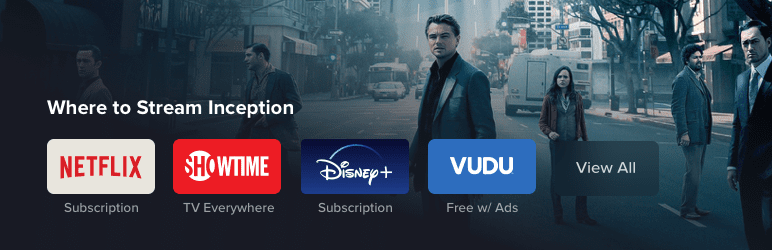
Description
Description
Does your site already help people find what to watch? Now tell them where to watch it with the Reelgood Publisher’s Widget. This plugin provides up to the second information for users of your site to see where to stream, rent, or purchase any movie or TV show and links for them to watch on the service of their choice with a single click.
The Reelgood Publisher’s Widget covers over 130,000 titles on over 300
popular and niche services, from subscribed options (Netflix, Hulu, Prime
Video, HBO, etc.) to rent or purchase options (Google Play, Vudu, iTunes,
Amazon, etc.) to free services (Sony Crackle, IMDb TV, Kanopy, etc.) and more.
The on-page widget is mobile friendly, customizeable, accepts your existing
affiliate codes for earning partner revenue, and automatically updates as content availability changes. Thanks to server side rendering, the widget boasts ultra-fast load times and is fully visible to search bots to increase traffic from Google, Bing and others.
Features
- Covers over 300 different services
- Add your affiliate codes and earn revenue when users rent, buy, or subscribe
- Where to watch information for 130,000+ movies and shows
- The web’s most accurate data
- Easy to use editor for styling on-page appearance
- Simple search function for adding where to watch info to your posts
- Ultra-fast load times (~65kb over network)
- Superior UX/UI from Webby award winning team
- SEO friendly to help rank for “Where to watch” searches
- Information automatically updates from our API so info is never out of date
Pricing
While the plugin is free to install and explore, you’ll need an API key to start creating posts with where to watch widgets on them. We offer flat fee as well as competitive revenue share payment programs for select partners. Contact us at [email protected] to learn more.
How to Add Where to Watch Info
Let’s imagine you’ve created a blog post about the 10 best animated movies of all time. Once you’re done writing, you’re ready to add widgets that show people where to watch each of the movies. Once you’ve installed the plugin and added your API key just follow these steps:
- Click “Where to Watch” button
- In the window that pops up, search for the title you’d like to add
- Select from the search results
- Click “Add”
That’s it! The widget will appear in your post editor just as it will on your page once published. If you want to change the way it looks, just click “edit” and adjust the settings and hit done. It will update instantly in your editor and on your site once you hit publish!


Get Started With Free Trial
Explore the offer details: Discover it now



Ratings
Rating breakdown
Details Information
Version
First Released
Total Downloads
Wordpress Version
Tested up to:
Require PHP Version:
Tags
Contributors
Languages
The plugin hasn't been transalated in any language other than English.
DIRECTORY DISCLAIMER
The information provided in this THEME/PLUGIN DIRECTORY is made available for information purposes only, and intended to serve as a resource to enable visitors to select a relevant theme or plugin. wpSocket gives no warranty of any kind, express or implied with regard to the information, including without limitation any warranty that the particular theme or plugin that you select is qualified on your situation.
The information in the individual theme or plugin displayed in the Directory is provided by the owners and contributors themselves. wpSocket gives no warranty as to the accuracy of the information and will not be liable to you for any loss or damage suffered by you as a consequence of your reliance on the information.
Links to respective sites are offered to assist in accessing additional information. The links may be outdated or broken. Connect to outside sites at your own risk. The Theme/Plugin Directory does not endorse the content or accuracy of any listing or external website.
While information is made available, no guarantee is given that the details provided are correct, complete or up-to-date.
wpSocket is not related to the theme or plugin, and also not responsible and expressly disclaims all liability for, damages of any kind, arising out of the use, reference to, or reliance on, any information or business listed throughout our site.