Plugin / Sports Rankings and Lists
kutu62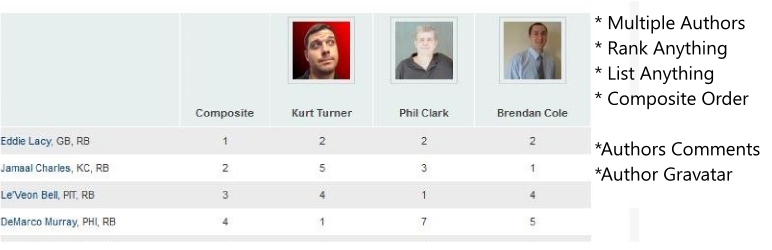
Description
Description
The plugin allows multiple authors (or just one) to rank a list of ANYTHING and display the table of rankings in posts or pages. You can choose to show a composite ranking alongside all of the author rankings as well as the author gravatar.
Authors can create comments when they create rankings which are displayed below the rankings in the wordpress post or page. Created with sports teams and athlete list / rankings in mind, but can be used for anything you want to easily list or rank. We came up with this idea to help multiple authors list / rank players on our fantasy football website. We’ve seen people use this to rank the top sports teams and players for fantasy baseball and fantasy basketball too. Many schools and sports clubs use this plugin to rank thier players.
Optimized for ranking athletes. For example, you can upload (or manually create) a list of sports players and then authors can drag and drop how they want to rank said player. You can create top 10 list, top 100 list, top 10 rankings etc for NFL, MLB, NBA and NHL players with ease! Fantasy football websites will find this extremely useful when creating fantasy football rankings for the draft and weekly matchups.
Key features:
- Upload or manually create default list to be used on any rankings / list you desire.
- Multiple Authors
- Composite of all authors list / rankings
- Show Gravatar for Authors above their name and rankings / list table.
- Users can sort rankings in the post for each author, default order is based on composite.
- Set default rank order for authors when created list.
- Drag and drop items being ranked (wordpress admin area)
- Upload csv list of items (players) or manually enter them.
- Three custom fields for adding information about items being ranked. example: Player Name, Team, Position
How To Create Rankings
This plugin was created with a multi-author blog in mind. If you’re not a multi-author blog the process will seem overly complicated but it’s segmented the way it is because it was created with multi-author blogs in mind. You do not need to run a multi-author blog for this plugin to work.
Site admins are the only people allowed to create list and list groups. The list group is what authors will see (and edit/rank) in the “rankings” section located directly below the “post” section in the wordpress admin panel.
- For example, you have a list of quarterbacks from the 2017 NFL season. You upload this as a csv in the “lists” section and name the list “2017 Quarterbacks”. Now you can use this list of players for multiple purposes. The purpose is called “list group”. So the first list group we will assign our list to is going to be “Week 1 QB Rankings”. And we will also make a list group for “The Top 10 Quarterbacks in 2017”. Once we’ve created those groups and assigned the list “2017 Quarterbacks” to those groups, wordpress will show those groups in the “rankings” section. From within the rankings section you and your authors can drag and drop the players (items) in the order your prefer. Now just grab the shortcode for the “list group” and insert it into a post.
Admins can create player lists and list groups. By default, only admins and editors can adjust their rankings. To add more roles such as author and contributor please visit the ranker settings page.
Step By Step:
- Install the plugin
- Go to Ranker Admin -> List – Upload or Create Lists of Items. Field 1: is default order, field 2 through 4 can be whatever you like.
- Go to Ranker Admin -> List Group – Create a new “group”. Choose a list created in the previous step. Click publish. This gives you a shortcode to be used in post or page for the list group.
- Now go to “Rankings” just below the Add Post option and edit your rankings! Drag and drop rankings where you desire as well as add comments.
- Copy the “list group” shortcode (from step 3) and paste it in post or page where you would like to see your list / rankings. If a user (you or another author) updates their rankings, the post must be updated by clicking the “update” button. If you don’t update the post it won’t pull in the new rankings updated by you and your authors.
READ THIS: If the above directions are hard to follow please view the screenshots here to get another perspective. Also, if you have issues with the CSV upload read this post about CSV files in windows and MAC.
We use custom post types to create list and rankings.
Unlock all feature and Remove Credits
If you enable some of the powerful features found in settings, a credit will be placed below your list pointing to WordPress.org and FantasyKnuckleheads.com
If you wish to unlock all the features and remove the credits contact kurt at fantasy knuckleheads dot com for premium version.
Examples of how to use:
- Top 10 list (up to 1000)
- Ranking Sports Teams
- Fantasy Football Rankings (baseball, basketball, hockey, etc)
- Power Rankings
- Plugin Rankings / Top WordPress Plugins
- You can rank and list anything you want! Great list creator.


Get Started With Free Trial
Explore the offer details: Discover it now



Ratings
Rating breakdown
DIRECTORY DISCLAIMER
The information provided in this THEME/PLUGIN DIRECTORY is made available for information purposes only, and intended to serve as a resource to enable visitors to select a relevant theme or plugin. wpSocket gives no warranty of any kind, express or implied with regard to the information, including without limitation any warranty that the particular theme or plugin that you select is qualified on your situation.
The information in the individual theme or plugin displayed in the Directory is provided by the owners and contributors themselves. wpSocket gives no warranty as to the accuracy of the information and will not be liable to you for any loss or damage suffered by you as a consequence of your reliance on the information.
Links to respective sites are offered to assist in accessing additional information. The links may be outdated or broken. Connect to outside sites at your own risk. The Theme/Plugin Directory does not endorse the content or accuracy of any listing or external website.
While information is made available, no guarantee is given that the details provided are correct, complete or up-to-date.
wpSocket is not related to the theme or plugin, and also not responsible and expressly disclaims all liability for, damages of any kind, arising out of the use, reference to, or reliance on, any information or business listed throughout our site.