Plugin / Text Hover
Scott Reilly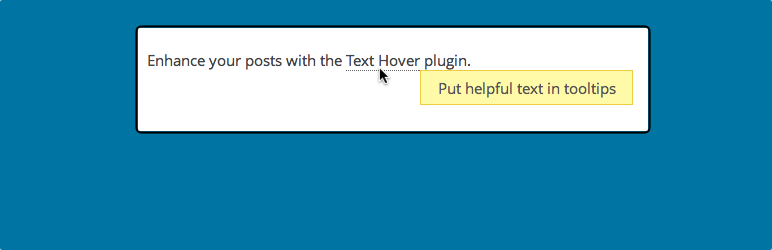
Description
Description
This plugin allows you to easily define help text that appears when a visitor hovers their mouse over a word or phrase in a post or page.
Via the plugin’s settings, simply specify the words or phrases that you want to be associated with hover text, and of course, the desired hover texts themselves. The format is quite simple; an example of which is shown here:
WP => WordPress
Matt => Matt Mullenweg
The Scooby Shack => the bar where the gang hangs out
Additional features of the plugin controlled both via settings and filters:
- Hover text can be enabled for comments (it isn’t by default)
- Hover text can be made case insensitive (it is case sensitive by default)
- Hover text can be limited to doing only one replacement per term, per post (by default, all occurrences of a term are given hovertext)
- Hover text can be rendered using the default browser tooltip (by default, the better-looking qTip2 library is used)
Note: This is not the same as my Text Replace plugin, which defines terms or phrases that you want replaced by replacement text when displayed on your site. Text Hover instead adds the hover text as additional information for when visitors hover over the term, which is otherwise displayed in the post as you typed it.
Links: Plugin Homepage | Plugin Directory Page | GitHub | Author Homepage
Hooks
The plugin exposes five filters for hooking. Typically, the code to utilize these hooks would go inside your active theme’s functions.php file. Bear in mind that all of the features controlled by these filters are configurable via the plugin’s settings page. These filters are likely only of interest to advanced users able to code.
c2c_text_hover_filters (filter)
The ‘c2c_text_hover_filters’ hook allows you to customize what hooks get text hover applied to them.
Arguments:
- $hooks (array): Array of hooks that will be text hovered.
Example:
/**
 * Enable text hover for post/page titles.
 *
 * @param array $filters Filters handled by the Text Hover plugin.
 * @return array
 */
function more_text_hovers( $filters ) {
    $filters[] = 'the_title'; // Here you could put in the name of any filter you want
    return $filters;
}
add_filter( 'c2c_text_hover_filters', 'more_text_hovers' );
c2c_text_hover (filter)
The ‘c2c_text_hover’ hook allows you to customize or override the setting defining all of the text hover terms and their hover texts.
Arguments:
- $text_hover_array (array): Array of text hover terms and their hover texts. This will be the value set via the plugin’s settings page.
Example:
/**
 * Add dynamic text hover.
 *
 * @param array $text_hover_array Array of all text hover terms and their hover texts.
 * @return array
 */
function my_text_hovers( $text_hover_array ) {
    // Add new term and hover text
    $text_hover_array['Matt'] => 'Matt Mullenweg';
    // Unset a term that we never want hover texted
    if ( isset( $text_hover_array['Drupal'] ) )
        unset( $text_hover_array['Drupal'] );
    // Important!
    return $text_hover_array;
}
add_filter( 'c2c_text_hover', 'my_text_hovers' );
c2c_text_hover_text_comments (filter)
The ‘c2c_text_hover_text_comments’ hook allows you to customize or override the setting indicating if text linkification should be enabled in comments.
Arguments:
- $state (bool): Either true or false indicating if text linkification is enabled for comments. The default value will be the value set via the plugin’s settings page.
Example:
// Prevent text linkification from ever being enabled in comments.
add_filter( 'c2c_linkify_text_comments', '__return_false' );
c2c_text_hover_case_sensitive (filter)
The ‘c2c_text_hover_case_sensitive’ hook allows you to customize or override the setting indicating if text hover should be case sensitive.
Arguments:
- $state (bool): Either true or false indicating if text hover is case sensitive. This will be the value set via the plugin’s settings page.
Example:
// Prevent text hover from ever being case sensitive.
add_filter( 'c2c_text_hover_case_sensitive', '__return_false' );
c2c_text_hover_once (filter)
The ‘c2c_text_hover_once’ hook allows you to customize or override the setting indicating if text hovering should be limited to once per term per piece of text being processed regardless of how many times the term appears.
Arguments:
- $state (bool): Either true or false indicating if text hovering is to only occur once per term. The default value will be the value set via the plugin’s settings page.
Example:
// Only show hovertext for a term/shortcut once per post.
add_filter( 'c2c_text_hover_once', '__return_true' );
c2c_text_hover_use_pretty_tooltips (filter)
The ‘c2c_text_hover_use_pretty_tooltips’ hook allows you to customize or override the setting indicating if text hovering should use prettier tooltips to display the hover text. If false, the browser’s default tooltips will be used.
Arguments:
- $state (bool): Either true or false indicating if prettier tooltips should be used. The default value will be the value set via the plugin’s settings page.
Example:
// Prevent pretty tooltips from being used.
add_filter( 'c2c_text_hover_use_pretty_tooltips', '__return_false' );


Get Started With Free Trial
Explore the offer details: Discover it now



Ratings
Rating breakdown
Details Information
Version
First Released
Total Downloads
Wordpress Version
Tested up to:
Require PHP Version:
Tags
Contributors
Languages
The plugin hasn't been transalated in any language other than English.
DIRECTORY DISCLAIMER
The information provided in this THEME/PLUGIN DIRECTORY is made available for information purposes only, and intended to serve as a resource to enable visitors to select a relevant theme or plugin. wpSocket gives no warranty of any kind, express or implied with regard to the information, including without limitation any warranty that the particular theme or plugin that you select is qualified on your situation.
The information in the individual theme or plugin displayed in the Directory is provided by the owners and contributors themselves. wpSocket gives no warranty as to the accuracy of the information and will not be liable to you for any loss or damage suffered by you as a consequence of your reliance on the information.
Links to respective sites are offered to assist in accessing additional information. The links may be outdated or broken. Connect to outside sites at your own risk. The Theme/Plugin Directory does not endorse the content or accuracy of any listing or external website.
While information is made available, no guarantee is given that the details provided are correct, complete or up-to-date.
wpSocket is not related to the theme or plugin, and also not responsible and expressly disclaims all liability for, damages of any kind, arising out of the use, reference to, or reliance on, any information or business listed throughout our site.