Plugin / Team
RadiusTheme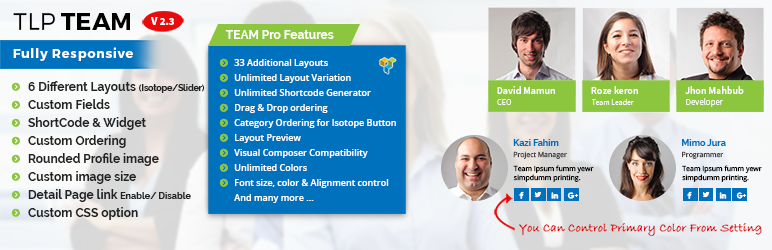
Description
Description
Plugin Demo | Documentation | Get Pro Version
Team
Team plugin is fully responsive & mobile friendly team members display plugin in WordPress. You can display your team members in different layout like Grids and Isotope.
Team allow you to create 5 different layouts Grid & Isotope. You can select layout for profile image square or rounded. So you can arrange your team member profile easily using square or rounded profile image.
Team Plugin shortcode generator have different option you can easily control which layout you want from 5 different layouts, primary color, image enable or disable option, detail page link option etc.
From admin end you can easily add your team member(s). You can set primary color, image size and detail page (Yes/No) link. It has widget included with settings how many want to display. It has the following fields members name, position, image, short bios and detail bios and social links.
It is HTML5 & CSS3 base and full object oriented (OOP) coding. Display your team member profile with Grid view and Isotope View using our ShortCode and widget. It comes with 4 default layouts in shortcode you can call layout like layout="1" / layout="2" / layout="3" / layout="isotope".
Total 5 Layouts
Grid View 1:[tlpteam col="4" id="10,50,52" member="8" orderby="title" order="ASC" layout="1"]
Grid View 2:[tlpteam col="2" id="10,50,52" member="8" orderby="date" order="ASC" layout="2"]
Grid View 3 (Rounded Profile image):[tlpteam col="2" member="8" id="10,50,52" orderby="menu_order" order="ASC" layout="3"]
Grid View 4 (Rounded Profile image):[tlpteam col="2" member="8" id="10,50,52" orderby="menu_order" order="ASC" layout="4"]
Isotope View with Name and Designation Sorting:[tlpteam col="4" member="8" id="10,50,52" orderby="menu_order" order="ASC" layout="isotope"]
For use template php file:-
<?php echo do_shortcode('[tlpteam col="4" id="10,50,52" member="8" orderby="title" order="ASC" layout="1"]'); ?>
<?php echo do_shortcode('[tlpteam col="2" id="10,50,52" member="8" orderby="date" order="ASC" layout="2"]'); ?>
<?php echo do_shortcode('[tlpteam col="2" id="10,50,52" member="8" orderby="menu_order" order="ASC" layout="3"]'); ?>
<?php echo do_shortcode('[tlpteam col="3" id="10,50,52" member="8" orderby="menu_order" order="ASC" layout="4"]'); ?>
<?php echo do_shortcode('[tlpteam col="4" member="8" orderby="menu_order" order="ASC" layout="isotope"]'); ?>
Features
- Fully Responsive & Mobile Friendly
- 6 Different layouts (4 Grid and 1 Isotope , 1 Casousel Slider)
- Custom meta filed
- ShortCode Generator
- Color control
- 3 types of ordering title/ date/ menu_order
- Image Size option
- Widget
- Primary color control
- Detail link (Yes/No)
Fully translatable
- POT files included (/languages/)
Available fields
- Title/Name (Post Title)
- Description (Post Content)
- Short Bio (Custom field)
- Designations (Custom field)
- Email (Custom field)
- Personal Web URL (Custom field)
- Telephone (Custom field)
- Location (Custom field)
- Social links (FB, Twitter, LinkedIn, Youtube and Google+ )
Shortcode settings
- Short Code:
[tlpteam col="2" member="8" id="10,50,52" image="false" orderby="title" order="ASC" layout="1"] - col = The number of column you want to display (1, 2, 3, 4)
- member = The number of the member, you want to display
- id = List of member IDs (comma-separated values, for example: 1,2,3)
- orderby = You can order by three ways (title, date, menu_order) here menu_order is custom order
- order = ASC, DESC
- layout = 1, 2, 3, 4, isotope
- image = By default image(profile image) is true
Pro Features
- Total 33 Layouts (14 Grid, 1 Table, 9 Isotope & 9 Carousel).
- Unlimited layout variation.
- Unlimited ShortCode Generator.
- Visual Composer compatibility.
- Drag & Drop ordering.
- Unlimited color.
- Gray scale image
- All fields control show/hide.
- All text size, color and text align control.
- Square / Rounded Image Style.
- Grid with Margin or No Margin.
- Social icon, color size and background color control.
- Detail page with Popup and Next Preview button.
- Skill fields with progress bar.
- Pagination (You can set how many show per page).
- Member Display by Department(s) wise.
- Specific Member(s) Display (Select by name in ShortCode)
- Detail Page Field control
- Category Ordering for Isotope Button.
- All Bottom color Control
- Single Member Popup
- Multiple Designation
- Added additional image for gallery
- Assign member as user
- Member Latest post show in detail/popup page
- Order by Random
For any bug or suggestion please mail us: [email protected]
Implement
- Short Code : [tlpteam col=4 member=8 orderby=title order=ASC layout=1]
- col = The number of column you want to create
- member = The number of the member, you want to display
- Go to the wp admin Widget page.
- Drag and drop “TPL Team” into active sidebar.
Requirements
- WordPress version: >= 4.3
- PHP version: >= 5.2.4


Get Started With Free Trial
Explore the offer details: Discover it now



Ratings
Rating breakdown
Details Information
Version
First Released
Total Downloads
Wordpress Version
Tested up to:
Require PHP Version:
Tags
Contributors
Languages
The plugin hasn't been transalated in any language other than English.
DIRECTORY DISCLAIMER
The information provided in this THEME/PLUGIN DIRECTORY is made available for information purposes only, and intended to serve as a resource to enable visitors to select a relevant theme or plugin. wpSocket gives no warranty of any kind, express or implied with regard to the information, including without limitation any warranty that the particular theme or plugin that you select is qualified on your situation.
The information in the individual theme or plugin displayed in the Directory is provided by the owners and contributors themselves. wpSocket gives no warranty as to the accuracy of the information and will not be liable to you for any loss or damage suffered by you as a consequence of your reliance on the information.
Links to respective sites are offered to assist in accessing additional information. The links may be outdated or broken. Connect to outside sites at your own risk. The Theme/Plugin Directory does not endorse the content or accuracy of any listing or external website.
While information is made available, no guarantee is given that the details provided are correct, complete or up-to-date.
wpSocket is not related to the theme or plugin, and also not responsible and expressly disclaims all liability for, damages of any kind, arising out of the use, reference to, or reliance on, any information or business listed throughout our site.