Plugin / Coupon Box for WooCommerce
VillaTheme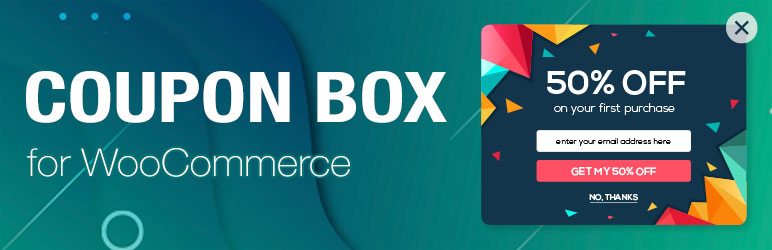
Description
Description
WooCommerce Coupon Box is a WooCommerce extension which helps you collect emails from your visitor. Don’t waste your traffic, Email marketing is an old-but-gold marketing channel. Coupon Box for WooCommerce helps you turn traffic into email subscribers. The plugin displays a subscribe email pop-up to new visitors. Offering coupons and ask them to subscribe email. Then the plugin will generate and send coupon code the subscribed email address. You can check the subscribed email addresses in the plugin back-end or sync with your MailChimp account.
How to send special gifts for customers on special occasion? How do visitors follow and subscribe email on WordPress? Coupon Box for WooCommerce plugin is the best solution for these purpose. It allows you to create coupons for e-commerce store on special occasion that allows new visitor to get instant discounts coupon for sharing your post on next purchase, allows loyal customers have coupon code for grateful ceremony, allows visitors follow and subscribe email on WordPress.
Important Notice:
- Compatible with WooCommerce 3.x or higher.
FEATURES
► Support Responsive on small screen device:
► Subscription form when a person visits your website: You can set initial time; disable for logged-in users; set time to show subscription form again if visitor does not subscribe
► Email: You can send email to your customer which contains coupon code, coupon value, date expires… Email content, header, heading are customizable with useful shortcode {coupon_value}, {coupon_code} , {date_expires}, {last_valid_date}, {site_title} and {shop_now}
-
Email design: Email are designed follow WooCommerce email template
-
CTA: A button “Shop now” inside email, which can be designed and edited to link to your shop
► Email Campaign: You can add how many campaign as you want
► Subscribed Email: List of subscribed emails with published date, campaign, given coupon and Mailchimp list
► Coupon: You can choose to send a unique coupon for each subscriber, or a coupon that you had already created or do not give coupon if you don’t want to
► MailChimp integrated: Each subscriber email can be added to your Mailchimp list, just enter your Mailchimp api key and select a mail list
► Export email Easy to export email by campaign or subscribed date.
► Uses WP’s Conditional Tags to show special page: You show popup box on the specific page.
► Design: It’s very easy to edit the coupon box with live preview, any changes will be applied immediately for you to see the differences
-
View Mode: You can see how coupon box looks like before and after a visitor subscribes
-
Show Coupon: If you set to give coupons for subscribers, beside sending coupon code via email address, enable this to print out the coupon code inside the coupon box after subscribing.
-
Popup Type: There are currently 15 popup effect for you to select, including Fade in & scale, slide in, 3D slit, 3D flip, sticky up…
-
Social Media: Let your visitor follow your social net work with beautiful social icon which can be edited. 10 most popular social networks are available: Facebook, Twitter, Google plus, Instagram, Youtube, Pinterest, Linkedin, Tumblr, Dribbble, VK
-
GDPR: A GDPR checkbox are optional for those who need to be GDPR consent.
-
Others: You can also edit button close, coupon box header, bacground image, button subscribe…
-
Custom CSS: And a custom css field for your customization. Any style you type in will be applied immediately so that you can easily find the changes and to check if your style is correct or not
► Shortcode: Use shortcode [wcb_widget type=”1″] and [wcb_widget type=”2″] to show subscription form with field email and button subscribe. Using type=”1″ will show form with field email and button subscribe in the same line but automatically transform to type=”2″(when on mobile) which has field email and button subscribe each in a single line
PRO VERSION
-
All free version feature
-
Support multilingual: Compatible with WPML and Polylang
-
Popup trigger: More trigger to show coupon box: Open coupon box when visitors scroll, open coupon box when visitors about to exit or random one of these triggers
-
Close Coupon box: If your visitors don’t subscribe and close Coupon box, you can set to minimize coupon box to top or bottom bar like a sticky menu to remind them to subscribe later that
-
ActiveCampaign integrated: If you are using ActiveCampaign, just enter API key and URL then select a list to add new subscribe emails to your ActiveCampaign contact
-
More input fields: You can add 4 more fields: name, mobile, birthday, gender besides the email field
-
Background effect: You can also add effect like snow, rain, falling leaves to the overlay when the coupon box appears
-
Google font: Header and body text of coupon box can use a lot of beautiful Google fonts
-
Header image: You can set background image for header, to add your website logo there, for instance
-
Layout: More layouts for you to select
-
Auto update: New update notification when available.
-
Premium Support: We response to all support topics within 24 hours on weekday (a bit longer over weekend)
MAY BE YOU NEED
Abandoned Cart Recovery For WooCommerce: Capture abandoned carts & send reminder emails to customers.
Import Shopify to WooCommerce: Import all products from your Shopify store to WooCommerce
Customer Coupons for WooCommerce: Display coupons on your website
Custom Email Blocks for WooCommerce: Create your own professional email design & content for all your outgoing emails
Virtual Reviews for WooCommerce: Virtual Reviews for WooCommerce helps generate virtual reviews, display canned reviews for newly created store
Thank You Page Customizer for WooCommerce: Customize your “Thank You” page and give coupons to customers after a successful order
Sales Countdown Timer: Create a sense of urgency with a countdown to the beginning or end of sales, store launch or other events
EU Cookies Bar: A very simple plugin which helps your website comply with Cookie Law
Lucky Wheel for WooCommerce: Offer customers to spin for coupons by entering their emails.
WordPress Lucky Wheel: WordPress Lucky Wheel gives you the best solution to get emails address from visitors of your WordPress website
Advanced Product Information for WooCommerce: Display more intuitive information of products such as sale countdown, sale badges, who recently bought products, rank of products in their categories, available payment methods…
LookBook for WooCommerce: Create beautiful Lookbooks, Shoppable with Product Tags
Photo Reviews for WooCommerce: Allow posting reviews include product pictures, review reminder, review for coupons.
Product Builder for WooCommerce: Allows your customers to build a full product set from small parts step by step. The plugin works base on WooCommerce with many useful features like compatible, email completed product, attributes filters.
Boost Sales for WooCommerce: Increase profit on every single order with Up-selling and Cross-selling
Free Shipping Bar for WooCommerce: Use free shipping as a marketing tool, encourage customers to pay more for free shipping.
Notification for WooCommerce: Social Proof Marketing plugin. Live recent order on the front-end of your site.
Multi Currency for WooCommerce: Switches to different currencies easily and accepts payment with only one currency or all currencies.
Documentation
Plugin Links


Get Started With Free Trial
Explore the offer details: Discover it now



Ratings
Rating breakdown
Details Information
Version
First Released
Total Downloads
Wordpress Version
Tested up to:
Require PHP Version:
Tags
Contributors
Languages
The plugin hasn't been transalated in any language other than English.
DIRECTORY DISCLAIMER
The information provided in this THEME/PLUGIN DIRECTORY is made available for information purposes only, and intended to serve as a resource to enable visitors to select a relevant theme or plugin. wpSocket gives no warranty of any kind, express or implied with regard to the information, including without limitation any warranty that the particular theme or plugin that you select is qualified on your situation.
The information in the individual theme or plugin displayed in the Directory is provided by the owners and contributors themselves. wpSocket gives no warranty as to the accuracy of the information and will not be liable to you for any loss or damage suffered by you as a consequence of your reliance on the information.
Links to respective sites are offered to assist in accessing additional information. The links may be outdated or broken. Connect to outside sites at your own risk. The Theme/Plugin Directory does not endorse the content or accuracy of any listing or external website.
While information is made available, no guarantee is given that the details provided are correct, complete or up-to-date.
wpSocket is not related to the theme or plugin, and also not responsible and expressly disclaims all liability for, damages of any kind, arising out of the use, reference to, or reliance on, any information or business listed throughout our site.