Plugin / Debug Bar Shortcodes

Juliette Reinders Folmer
Frequently Asked Questions (FAQ)

This plugin is only meant to be used for development purposes, but shouldn’t cause any issues if run on a production site.
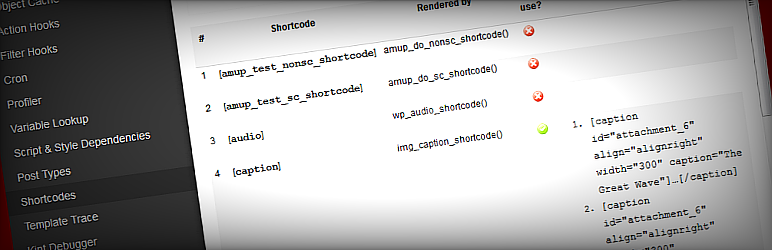
A shortcode is a WordPress-specific code that lets you do nifty things with very little effort. Shortcodes can embed files or create objects that would normally require lots of complicated, ugly code in just one line. Shortcode = shortcut.Source For more information about using shortcodes in WordPress: – WP Codex on shortcodes – WP Codex on the Shortcode API
There are two possibilities here: Either your shortcode has not been properly registered using the ShortCode API. Or your shortcode might only be registered conditionally and the current page does not meet those conditions.
See the previous answer.
To determine whether a shortcode is used in a page, only the post content is evaluated. If you add content to the page using shortcodes in other areas (for example: widgets) or via the theme, those uses will not be recognized.
Generally speaking you can. However, don’t forget to always check whether the shortcode is registered before you use it! It may not be available on all pages and surely not on all WP installs. if ( shortcode_exists( 'shortcode' ) ) { /* Your code here */ // echo do_shortcode( 'some content containing a [shortcode /]' ); }
I’ve tried to make this as easy and painless as possible. Just add a filter to enrich the information this plugin has about your shortcode. The easiest way is to use the db_shortcodes_info_{shortcode} filter which will only be applied to your shortcode. add_filter( 'db_shortcodes_info_{your_shortcode}', 'filter_my_shortcode_info' ); function filter_my_shortcode_info( $info ) { // enrich the object return $info; } The $info object you receive and are expected to return will contain the currently known information about the shortcode. $info is expected to contain (a selection of) the following parameters: stdClass( $name = (string) 'Friendly name for your shortcode', $description = (string) 'Description of your shortcode', $self_closing = (bool) true/bool, // whether the shortcode is self-closing $parameters = array( 'required' => array( (string) 'attribute_name' => (string) 'attribute description', ), 'optional' => array( (string) 'attribute_name' => (string) 'attribute description', ), ), $info_url = '', ) If you happen to already provide similar information using the sim_{shortcode} filter for the LHR-Shortcode list plugin, no need to do anything extra, that information will be picked up by this plugin. Similarly, if you provide information for the Shortcake/Shortcode UI feature plugin, that information will be used automatically to enrich the available information.
In version 1.0 of the plugin $info variable passed to the filter was an array. This has changed in version 2.0. I’m aware that this is a backward compatibility break, but I’ve done some quite extensive searches and considering I did not find any plugin using the filter (yet), I decided this backward compatibility break would have little to no effect and therefore would be safe to implement. If you did already have a filter in place, sorry I didn’t find your plugin/theme! Not to worry though, I’ve tried to make it really easy to upgrade your code. First off, you’ll need to change the add_filter() hook in code and your function signature to now received two variables. The first variable will be the new object, but the second variable will still be an array in the format which was passed in 1.0 so you can continue to use that in your function to enrich the information. Secondly, as all this plugin uses are the properties of the object, you can just cast your array to an object in the return and it’ll work again. Old code for v1.0: add_filter( 'db_shortcodes_info_{your_shortcode}', 'filter_my_shortcode_info' ); function filter_my_shortcode_info( $info ) { // enrich the array return $info; } Updated code for v2.0: add_filter( 'db_shortcodes_info_{your_shortcode}', 'filter_my_shortcode_info', 10, 2 ); function filter_my_shortcode_info( $info_object, $info ) { // enrich the array return (object) $info; }
Have you read what it says in the beautifully red bar at the top of your plugins page ? As it says there, the Debug Bar plugin needs to be active for this plugin to work. If the Debug Bar plugin is not active, this plugin will automatically de-activate itself.

Ratings

5
3 reviews

Rating breakdown

Details Information

Version

2.0.3

First Released

22 Dec, 2013

Total Downloads

10,877

Wordpress Version

3.6 or higher

Tested up to:

4.4.20

Require PHP Version:

-

Tags

Contributors

jrf

Languages

DIRECTORY DISCLAIMER

The information provided in this THEME/PLUGIN DIRECTORY is made available for information purposes only, and intended to serve as a resource to enable visitors to select a relevant theme or plugin. wpSocket gives no warranty of any kind, express or implied with regard to the information, including without limitation any warranty that the particular theme or plugin that you select is qualified on your situation.

The information in the individual theme or plugin displayed in the Directory is provided by the owners and contributors themselves. wpSocket gives no warranty as to the accuracy of the information and will not be liable to you for any loss or damage suffered by you as a consequence of your reliance on the information.

Links to respective sites are offered to assist in accessing additional information. The links may be outdated or broken. Connect to outside sites at your own risk. The Theme/Plugin Directory does not endorse the content or accuracy of any listing or external website.

While information is made available, no guarantee is given that the details provided are correct, complete or up-to-date.

wpSocket is not related to the theme or plugin, and also not responsible and expressly disclaims all liability for, damages of any kind, arising out of the use, reference to, or reliance on, any information or business listed throughout our site.

Keep Leading Your Followers!
Share it for them.



