Plugin / Display WP Admin Pages in the Frontend – WP Frontend Admin
WP Frontend Admin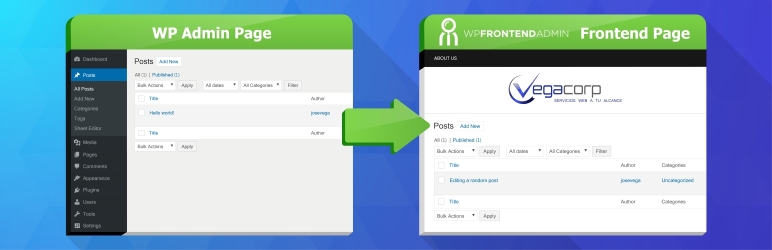
Changelog
Changelog
1.8.1 – 2019-11-11
- CHANGE – Allow to display custom page instead of the wp die page when users don’t have the right capabilities
- CHANGE – Quick settings – Allow to hide wp-admin notices
- CHANGE – Add support for Dokan access restrictions
- CHANGE – Open the gutenberg editor full screen
- CHANGE- wp-admin – logo should link to our website, not the checkout page
- FIX – Position issue with the search input for posts on mobile
- FIX – When scrolling up and down on iphone, the content jumps
- FIX – Wrong url encoding in rare cases
- FIX – Problem when loading the wp-login.php page from a redirection of a custom login page
- INTERNAL – Add option to disable the friendly frontend message indicating the needed capabilities or roles “You need more permissions to view this page”
1.8.0 – 2019-10-11
- NEW – Add advanced option to redirect users to create new post after publishing a post
- NEW – Add option to disable the “move of frontend page to the main window”
- NEW – Add option to edit texts in the frontend editor
- NEW – Add option to replace the post edit/create screen with direct elementor editor
- NEW – Add option to show any URL keywords as full screen
- NEW – Add option to show posts created by the current user only
- NEW – Add shortcode for showing the login form: [wp_frontend_admin_login_form redirect_to=””]
- NEW – Added option to settings page to add custom JS for advanced customizations
- NEW – Detect pages with lists of posts and allow to disable table columns in the frontend editor
- CHANGE – Prevent errors when users use backward/forward quotes in the shortcode
- CHANGE – When a login attempt fails, redirect to our custom login page instead of the wp-login page
- CHANGE – When a user logs out, redirect to our custom login page (or home if the custom login page is not defined) instead of sending to the wp-login page
- FIX – Allow frontend pages in iframes on wp-admin pages (don’t redirect them to the main window, only redirect frontend pages in iframes on frontend pages)
- FIX – Improve the update of the admin content height when the content changes
- FIX – Remove blank space below the admin content inherited from the admin css
- FIX – The custom css doesn’t work when viewing the customizer in the frontend
- FIX – The free version doesn’t allow the posts list when the shortcode URL is not “edit.php” exactly
- INTERNAL – Added filter vg_admin_to_frontend/open_frontend_pages_in_main_window to control which pages are opened in the main window and which pages can be opened inside the iframe
1.7.0 – 2019-08-19
- NEW – Add option to define the frontend dashboard URL
- NEW – Add option to set login page and redirect to login page instead of showing inline login form
- NEW – Automatically redirect direct wp-admin pages to the frontend dashboard equivalent
- CHANGE – Allow to use the quick settings section on full screen pages
- CHANGE – Automatically redirect the restricted pages to the frontend dashboard
- CHANGE – Don’t apply access restrictions on the settings page of the plugin when viewed by administrators to let them change settings if they get locked out
- CHANGE – Don’t show the “global pages” metabox for non-administrators
- CHANGE – Don’t show the “view on the frontend” toolbar option for non-administrators
- CHANGE – Open the wpforms editor full screen
- CHANGE – Update content height when window is resized
- FIX – Access restriction option blocks all URLs when the site uses https
- FIX – Added compatibility for formidable forms- open the form editor in full screen
- FIX – Ignore weird tags found in the admin page title when generating the frontend page title
1.6.1 – 2019-07-13
- NEW – Added option to hide all wp-admin notices on the frontend
- CHANGE – Added compatibility with jQuery 3
- CHANGE – Global pages – Clear elementor’s css cache after pages are copied
- CHANGE – Hide admin bar on the frontend only for non-master users
- CHANGE – Notify in the welcome page when the admin URL and frontend URL use a different protocol (https vs http) to prevent issues
- CHANGE – Override the “edit post” link from the “wp user frontend” plugin to use our own frontend editor
- CHANGE – Some wp-admin pages don’t load our backend.js file, so we automatically insert it from the frontend page in those cases
- CHANGE – Replace the “edit” link in the frontend to edit elementor posts and pages with elementor in full screen mode
- FIX – Multisite – When we activate the “hide admin bar” option, the frontend pages show an error 5xx
- FIX – When using the frontend page, the tinymce plugins don’t insert content into the tinymce editor
- FIX – When we view pages as admin, it creates duplicate “edit” pages when generating the “edit” link in the frontend
1.6.0 – 2019-06-26
- NEW – Add option to auto scroll towards custom popups when the popups are opened
- NEW – Add option to define whitelisted admin URLs and redirect the other URLs to the home
- NEW – Add option to synchronize pages in multisite network
- NEW – Added option “allow_any_url” to the shortcode to allow to display external pages or from other subsites or other frontend pages
- NEW – Added option to define a demo account and auto login users with the demo credentials
- NEW – Added option to hide system pages containing our shortcode to prevent normal users from editing them in the frontend dashboard
- NEW – Added option use_desktop_in_mobile to the shortcode to use the desktop version on mobile devices when the admin page is not responsive
- NEW – Automatically redirect frontend pages loaded from inside the iframe to the parent window
- NEW – Multiste – Added option to use global settings from main site
- CHANGE – Added fallback to the admin JS to load custom css from the frontend page when it’s available, to add compatibility to admin pages that don’t support query strings
- CHANGE – ELEMENTOR – When using the elementor editor on the frontend, open it in full screen
- CHANGE – Multisite – Automatically use the backend URL of the current site without having to update the shortcode
- FIX – Error when viewing the post editor on a mobile device – content width was cut in half
- FIX – When we upload files on the wp media page in the frontend, the loading indicator doesn’t appear when the url contains a query string
- FIX – When we used the gutenberg editor in the frontend, the editor was 80px tall
- FIX – When we view an admin page in the frontend, which requires higher permissions, the loading indicator never disappears
V 1.5.2 – 2019-04-15
- NEW – Added compatibility with Elementor to create/edit pages in the frontend completely.
- NEW – Added allow_single_post_edit parameter to the shortcode to allow to create a frontend page that edits a single post directly.
- FIX – Sometimes tinymce urlencodes the url and it breaks the frontend load, so we use urldecode to prevent that
Other small tweaks.
V 1.5.1 – 2019-03-04
- NEW – Added shortcode: [vg_display_edit_link] to display edit link on any post or page and open the frontend editor
- CHANGE – Quick settings – Indicate what user roles and capabilities can view a page to facilitate the setup of user roles and capabilities.
- CHANGE – Frontend page – When the user gets “You’re not allowed to view this page”, show instructions on how to setup the right capabilities and user roles because this page is being viewed by an admin.
- CHANGE – Updated to freemius v2.2.4.
- FIX – Minor PHP warning.
Other small tweaks.
V 1.5.0 – 2018-12-08
- NEW – Quick settings – Add “Remove element” tool to hide elements from the admin page on the frontend by point-and-clicking
- NEW – Added compatibility with wpforms > entries page
- NEW – Added support for Cloudflare’s Rocket Loader
- CHANGE – Updated plugin logo on wp-admin and wp.org
- CHANGE – Allow to disable the quick settings bar
- CHANGE – Display the quick settings as a left column so it looks better on any theme and simpler to use
- FIX – When the admin page loads on the frontend, the admin menu/bar appears for a second
- FIX – jQuery missing when the quick settings load before jquery loads


Get Started With Free Trial
Explore the offer details: Discover it now



Ratings
Rating breakdown
Details Information
Version
First Released
Total Downloads
Wordpress Version
Tested up to:
Require PHP Version:
Tags
Contributors
Languages
The plugin hasn't been transalated in any language other than English.
DIRECTORY DISCLAIMER
The information provided in this THEME/PLUGIN DIRECTORY is made available for information purposes only, and intended to serve as a resource to enable visitors to select a relevant theme or plugin. wpSocket gives no warranty of any kind, express or implied with regard to the information, including without limitation any warranty that the particular theme or plugin that you select is qualified on your situation.
The information in the individual theme or plugin displayed in the Directory is provided by the owners and contributors themselves. wpSocket gives no warranty as to the accuracy of the information and will not be liable to you for any loss or damage suffered by you as a consequence of your reliance on the information.
Links to respective sites are offered to assist in accessing additional information. The links may be outdated or broken. Connect to outside sites at your own risk. The Theme/Plugin Directory does not endorse the content or accuracy of any listing or external website.
While information is made available, no guarantee is given that the details provided are correct, complete or up-to-date.
wpSocket is not related to the theme or plugin, and also not responsible and expressly disclaims all liability for, damages of any kind, arising out of the use, reference to, or reliance on, any information or business listed throughout our site.