Plugin / Drag and Drop Multiple File Upload – Contact Form 7
Glen Don L. Mongaya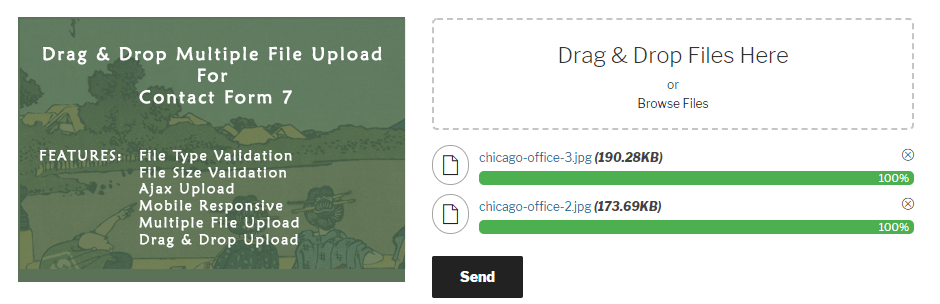
Changelog
Changelog
1.3.1
- Fixed – Browser Compatibility ( Error Uploading files in Edge, Safari and Internet Explorer )
- Improved – Removed error text if there are muliple error ( File upload validation )
1.3.0
- Fixed – Multiple Drag & Drop fields in one form ( Validation Issues – Max File not working correctly )
- Added – Added “deleted…” status when removing file.
- So that the user know that file deletion is in progress…
- Fixed – Responsive issues on Mobile < 767px screen.
- Added – Added ‘/wpcf7-files’ directory inside ‘/wp_dndcf7_uploads’ to temporary store files instead of relying contact form 7.
- Added – Auto delete files inside ‘/wpcf7-files’ dir 1 hour(3200 seconds) after submission.
- It was a problem with contact form 7 before that files only last 60 seconds and it will automatically deleted.
- Improved – Optimized and Improved Php Code & Javascript structure and functionalities. ( removed redundant code, removed spaces, etc )
- Added – Links going to Pro Version.
1.2.6.0
- Fixed – Allow to upload file with the same filename.
- Fixed – Can’t upload image after delecting (https://wordpress.org/support/topic/cant-upload-image-after-deleting-it/)
- Fixed – Max-file issue (https://wordpress.org/support/topic/max-file-issue/)
- Added – a note message when file reached the max-file Limit ( “To inform user that some of the files are not uploaded” ).
- Added – Better Ajax deletion ( Remove files from the server – Only if
Send As Attachmentis checked ) - Optimized – Form send loading time has been optimized ( Improved loading time for large attachment )
- Fixed – Bug reported by @palychwp ”
remove file still send sends with the form(https://wordpress.org/support/topic/file-uploading-is-working-incorrect/) - Added – Validate File/Attachment first before the upload start (“some says it’s frustating :)”)
- (PHP or Server side validation still there for security and better validation)
- Improved file counting via
LocalStorageinstead of Global variable.
1.2.5.0
- Fixed – Please Update to 1.2.5.0 to fixed disable button issue.
1.2.5
- Fixed – Improved ( Disable button while upload is on progress )
- Fixes – Validate file size limit before uploading the file ( https://wordpress.org/support/topic/file-uploading-is-working-incorrect/ )
1.2.4
- Added – Support WPML using .po and .mo files
- Added – Added to support multilingual ( using Poedit )
- Fixed – Prevent attachment from sending to Mail(2) if field attachment is not set. (https://wordpress.org/support/topic/problem-with-2th-mail-attachment-2/)
- Added – Disable ‘submit’ button while upload is on progress…
1.2.3
- Added – Multiple Drag and Drop fields in a form
- Added – Options in admin for error message
- Added – Option that allow user to send attachment as links
- Added – Added new folder name
wp_dndcf7_uploadsto separate files from wpcf7_uploads ( When option ‘Send Attachment as links?’ is check ).
1.2.2
- Add – Create admin settings where you can manage or change text in your uploading area. It’s under ‘contacts’ > ‘Drag and Drop’.
- New – Empty or Clear attachment file when Contact Form successfully send.
- Fixes – Fixed remove item bugs when file is greater than file limit.
- Fixes – Changed ‘icon-moon’ fonts to avoid conflict with the other themes.
- New – Added text domain for language translations.
1.2.2
- Issue – fixed bug when file is not required(*).
- Issue – fixed error on ‘wpcf7_mail_components’ components hooks when there’s no file.
1.2.1
- Issue – fixed bug when file is not required(*).
- Issue – fixed error on ‘wpcf7_mail_components’ components hooks when there’s no file.
1.2
- Add admin option to limit the number of files. (Maximum File Upload Limit)
1.1
- This version fixes on user drop validation.
- Optimized Javascript File
1.0
- Initial Release


Get Started With Free Trial
Explore the offer details: Discover it now



Ratings
Rating breakdown
Details Information
Version
First Released
Total Downloads
Wordpress Version
Tested up to:
Require PHP Version:
Tags
Contributors
This plugin has been closed.
Languages
The plugin hasn't been transalated in any language other than English.
DIRECTORY DISCLAIMER
The information provided in this THEME/PLUGIN DIRECTORY is made available for information purposes only, and intended to serve as a resource to enable visitors to select a relevant theme or plugin. wpSocket gives no warranty of any kind, express or implied with regard to the information, including without limitation any warranty that the particular theme or plugin that you select is qualified on your situation.
The information in the individual theme or plugin displayed in the Directory is provided by the owners and contributors themselves. wpSocket gives no warranty as to the accuracy of the information and will not be liable to you for any loss or damage suffered by you as a consequence of your reliance on the information.
Links to respective sites are offered to assist in accessing additional information. The links may be outdated or broken. Connect to outside sites at your own risk. The Theme/Plugin Directory does not endorse the content or accuracy of any listing or external website.
While information is made available, no guarantee is given that the details provided are correct, complete or up-to-date.
wpSocket is not related to the theme or plugin, and also not responsible and expressly disclaims all liability for, damages of any kind, arising out of the use, reference to, or reliance on, any information or business listed throughout our site.