Plugin / Social Media Flying Icons | Floating Social Media Icon

Acurax
Frequently Asked Questions (FAQ)

To hide a social media icon, Just don’t give any value for that icon link.. it will automatically gets hidden.
Our Plugin Uses Hooks to integrate the supported javascripts styles and html to the theme. So Make sure your theme footer.php have and header.php have , Most of all the plugins work with the support of this code and if this is not present on your theme.. Its your themes mistake..
It can be easily done.. Just to go Theme Editor which is under appearance and select footer.php and add before the closing body tag which is and then go and edit header.php and add just before the closing head tag which is

Yes, You can.. Just to go “Acx Social icons” Menu which is in left side on wp-admin and in that page you will find “Display Mode” option. Select it to Manual. But then there will be no animation but you can Use Our Shortcode or PHP Code to display the social media icons anywhere you want.
You can use the shortcode [DISPLAY_ACURAX_ICONS] in any post or page or even in your custom post types. You can also use anywhere in the theme files to show this icons.(But note that manual icons display will not have the animation
Yes, You can have as many shortcode or php code to display the social media icons
You can choose social media icon style, size, for each widget configuration so that you can have different style of icon in sidebar or footer widgets.
If you want to hide a particular social media icon, you just make the configuration field for that social media service blank and it will not be shown.
Yes, each of the shortcode or php generated social media icon set is having unique css class and it help you to define specific style for each social media icon set.
Yes, You can use shortcode to display icon and set social media icon size,what ever you want which is supported by the plugin. You can override the global icon theme and size configuration using some attributes on shortcode. As you know we have given icon themes, Numbers to identify. Right now we have themes like, 1,2,3,4…. If you want to show icons with Theme # 5, You can use the shortcode [DISPLAY_ACURAX_ICONS theme=”5″] Here we using the attribute “theme” to define the theme number (Make sure you use the available theme numbers, You can see the theme numbers on plugin settings page) If you want to show the icons with a custom size 50px.. you can use the shortcode [DISPLAY_ACURAX_ICONS size=”50″] Here we using the attribute “size” to define the icon size (Make Sure you specifying size which is not more than “55” which is the maximum icon support of this plugin, DO NOT ADD px, Just Add the Size in Numerical) So if you use a shortcode [DISPLAY_ACURAX_ICONS theme=”10″ size=”45″ align=”left”] It will show the Social Media Icon with Icon Theme 10 and Icon size will be 45px width and height and it aligns to left.
Floating Social Media Icon displays social media icons with its own style, but in some cases, some theme css styles can override the styles of the social media icons generated by floating social media icon and thats what causing the issue.
Depending on the theme, the issue can happen, for this case, we have added a theme conflict fix in misc page, please enable it and take a look.
Sorry, its only possible in our premium version, you can have unlimited number of extra icons in our premium version and you can even link icons to your website pages or anywhere.
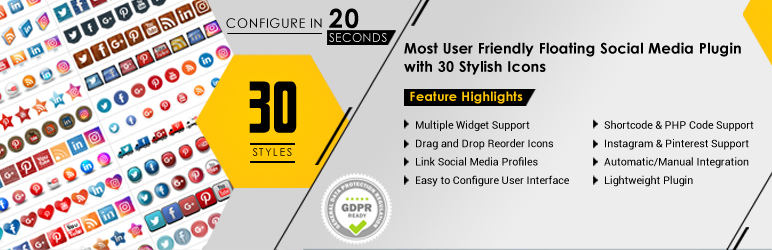
Plugin Support Social Media Widget with almost same features of the shortcodes, You can have many number of widgets where on each widget you can configure the Social Media Icons size and Icon Design/Style. To add a widget to your sidebar.. you theme must support sidebars. Go to Appearance >> Widgets,to add “Acx Social Icons” widget to your sidebar.
Yes, possible, but only in our premium version, You can have unlimited number of extra icons which links to anywhere you need.
Normally, there is no such cases, We always release updates which will not change any of your social media plugin configuration or settings, but in some rare cases, it may needed, but still it will be only done after your confirmation.
Plugin Support More than one instance of Social Media Widgets, SO you can use as many as widget on your sidebars.
Acurax Provide Most of all the wordpress related services like website design and development including plugin development, theme design and coding, Graphics Design like header image designing etc. we can do your projects. So here you get what u needs to get done and we getting business so a part of that can be used for the time that we spend to develop plugins like this
Most of all the social media plugins have more and more options which is only easily understandable by advanced users, those have a bunch of social media profile integrations. But in our case we chosen the must to have icons and made it perfect animation and position styling.. More icons on website make destroy your website look.. So use the essentials with sexy display.
Sorry, Its only available in our premium version.
You need to visit the plugin settings page once after upgrading to complete the update process.Only after that it will show the icons.
We use wordpress hooks to place the flying icons code, and in some themes, the wp_footer hooks may be called within some div or html elements and it can cause this issue, You can try enabling the floating fly fix at our misc page, or contact our support for a one to one issue resolution. Have more questions ? Drop a mail and we shall get back to you with the answers.

Ratings

4.8
583 reviews

Rating breakdown

Details Information

Version

4.3.4

First Released

09 Mar, 2012

Total Downloads

1,380,812

Wordpress Version

3.0 or higher

Tested up to:

5.2.4

Require PHP Version:

5.3 or higher

Tags

Contributors

Languages

The plugin hasn't been transalated in any language other than English.

DIRECTORY DISCLAIMER

The information provided in this THEME/PLUGIN DIRECTORY is made available for information purposes only, and intended to serve as a resource to enable visitors to select a relevant theme or plugin. wpSocket gives no warranty of any kind, express or implied with regard to the information, including without limitation any warranty that the particular theme or plugin that you select is qualified on your situation.

The information in the individual theme or plugin displayed in the Directory is provided by the owners and contributors themselves. wpSocket gives no warranty as to the accuracy of the information and will not be liable to you for any loss or damage suffered by you as a consequence of your reliance on the information.

Links to respective sites are offered to assist in accessing additional information. The links may be outdated or broken. Connect to outside sites at your own risk. The Theme/Plugin Directory does not endorse the content or accuracy of any listing or external website.

While information is made available, no guarantee is given that the details provided are correct, complete or up-to-date.

wpSocket is not related to the theme or plugin, and also not responsible and expressly disclaims all liability for, damages of any kind, arising out of the use, reference to, or reliance on, any information or business listed throughout our site.

Keep Leading Your Followers!
Share it for them.



