Plugin / JQuery Vertical Mega Menu Widget

Lee Chestnutt
Frequently Asked Questions (FAQ)

Upload the plugin through Plugins > Add New > Upload interface or upload jquery-vertical-mega-menu folder to the /wp-content/plugins/ directory Activate the plugin through the ‘Plugins’ menu in WordPress In the widgets section, select the jQuery vertical mega menu widget and add to one of your widget areas Select one of the WP menus, set the required settings and save your widget
One main reason for this is that the plugin adds the required jQuery code to your template footer. Make sure that your template files contain the wp_footer() function. Another likely cause is due to other non-functioning plugins, which may have errors and cause the plugin javascript to not load. Remove any unwanted plugins and try again. Checking with Firebug will show where these error are occuring.
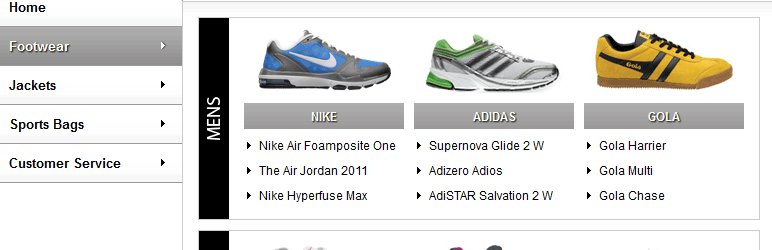
The widget works by taking the standard menu structure and creating the sub-menus from the nested links. To get the full effect you need to have 3 levels within the custom menu: First level is used for the main menu items The second level is used to create the sub-menu headings The 3rd level links are then grouped together under the headings to create the menu options Example: Products –> Category –> Product Ranges
Make sure that your theme does not have the side column, where your menu is located, set to overflow: hidden in the style sheet file – this will hide the flyout menu

Ratings

3.9
7 reviews

Rating breakdown

Details Information

Version

1.3.3

First Released

12 Mar, 2011

Total Downloads

154,816

Wordpress Version

3.0 or higher

Tested up to:

3.4.2

Require PHP Version:

-

Tags

Contributors

Languages

The plugin hasn't been transalated in any language other than English.

DIRECTORY DISCLAIMER

The information provided in this THEME/PLUGIN DIRECTORY is made available for information purposes only, and intended to serve as a resource to enable visitors to select a relevant theme or plugin. wpSocket gives no warranty of any kind, express or implied with regard to the information, including without limitation any warranty that the particular theme or plugin that you select is qualified on your situation.

The information in the individual theme or plugin displayed in the Directory is provided by the owners and contributors themselves. wpSocket gives no warranty as to the accuracy of the information and will not be liable to you for any loss or damage suffered by you as a consequence of your reliance on the information.

Links to respective sites are offered to assist in accessing additional information. The links may be outdated or broken. Connect to outside sites at your own risk. The Theme/Plugin Directory does not endorse the content or accuracy of any listing or external website.

While information is made available, no guarantee is given that the details provided are correct, complete or up-to-date.

wpSocket is not related to the theme or plugin, and also not responsible and expressly disclaims all liability for, damages of any kind, arising out of the use, reference to, or reliance on, any information or business listed throughout our site.

Keep Leading Your Followers!
Share it for them.



