Plugin / myRepono WordPress Backup Plugin
myRepono (ionix Limited)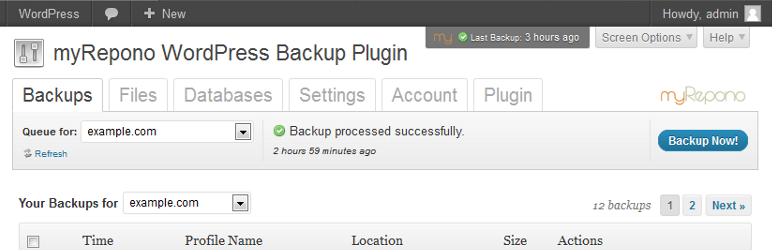
Changelog
Changelog
2.0.12
Minor code changes to address PHP 7 compatibility issues.
2.0.11
The plugin will now detect if a connection to the myRepono system has failed and will automatically disable connection attempts for 3 minutes – this is to protect against disruption to the WordPress administration panel if the myRepono system becomes unavailable. A ‘Create .htaccess File’ option has been added to the ‘Plugin’ section to allow for easy creation of a ‘.htaccess’ file to override restrictions which may be affecting access to the API file. Header tags have been updated to aid screenreader usage. Minor changes have been made to data tables to improve appearance in WordPress 4.3+.
2.0.10
Minor code adjustments.
2.0.9
Backup notes may now be added and edited via the ‘Backups’ section of the plugin when the ‘Manage Backups’ permission is enabled.
2.0.8
Support for new ‘Backup Notes’ feature has been added to the plugin enabling you to view any backup notes you have added. Minor adjustments to data table styles have been applied.
2.0.7
Minor adjustment to URL detection.
2.0.6
Minor adjustment to improve appearance in WordPress version 3.8.
2.0.5
Minor adjustment to improve reliability of plugin URL detection – traditional method appears to be disrupted by some third-party plugins causing the ‘Connect Plugin’ process to fail.
2.0.4
HTTP/HTTPS connection timeouts adjusted to 30 seconds to reduce loading delays caused by connection timeouts. Minor change to resolve edge-case PHP warning.
2.0.3
New set-up guidance text added to help explain ‘Connect Plugin’ process. Admin menu has been changed to avoid conflicts resulting in missing menu. Plugin security adjusted to resolve edge-case admin panel access issues.
2.0.2
Minor adjustment to resolve editor/author administration panel login issues.
2.0.1
Minor adjustments to address notice shown with WordPress debug mode enabled.
2.0.0
Version 2.0.0 is a complete re-write of the myRepono WordPress Backup Plugin, significant new features include:
- A ‘Connect Plugin’ system which streamlines the plugin set-up process and enables each plugin to be assigned unique permissions which control what features are available, the ‘Connect Plugin’ system also significantly enhances the security of the plugin.
- ‘Files’ and ‘Databases’ sections have been added enabling you to manage your file and database selections from your WordPress administration panel.
- A ‘Settings’ section has been added enabling you to manage all your domain settings and domain profiles from your WordPress administration panel.
- The ‘Backup Queue’ and ‘Backup Now!’ features have been added, enabling you to provoke new backups and monitor your backup progress from your WordPress administration panel.
Plugin version 2.0.0 has been tested with WordPress versions, 2.8, 2.9, 3.0, 3.1, 3.2, 3.3, 3.4, 3.4.1 and 3.5-alpha-21989 (2012-09-25). Please contact us immediately if you experience any installation issues: https://myRepono.com/contact/new/
Upgrading from version 1.x.x:
Due to new security measures the new plugin can not be setup automatically using your existing plugin configuration – we sincerely apologise for any inconvenience this may cause! However, when completing the setup process you will be able to connect this plugin to your existing domain configuration so your backups and domain configuration will continue as normal and without disruption! To begin, simply upgrade your plugin and then follow the ‘Connect Plugin’ process, then when confirming your plugin permissions you will be shown an ‘Existing Domain Configurations’ notification which will allow you to select your existing domain configuration to connect with your plugin.
1.1.7
Release of plugin version 1.1.7 coincides with API version 1.7 release, all users should upgrade their myRepono WordPress Backup Plugin immediately to automatically upgrade their myRepono API to version 1.7.
1.1.6
Minor adjustments to improve Windows compatibility. Release of plugin version 1.1.6 coincides with API version 1.6 release, all users should upgrade their myRepono WordPress Backup Plugin immediately to automatically upgrade their myRepono API to version 1.6.
1.1.5
The plugin’s methods for connecting to the myRepono.com systems have been revised to address issues with incorrectly configured servers.
1.1.4
New stored backups setting options allowing storage of up to 10,000 backups per domain. Release of plugin version 1.1.4 coincides with API version 1.5 release, all users should upgrade their myRepono WordPress Backup Plugin immediately to automatically upgrade their myRepono API to version 1.5.
1.1.3
Plugin will now pause domain configuration when ‘Reset Default Configuration’ option is used, this prevents failed backup errors when API is replaced when logging back in to the plugin. Release of plugin version 1.1.3 coincides with API version 1.4 release, all users should upgrade their myRepono WordPress Backup Plugin immediately to automatically upgrade their myRepono API to version 1.4.
1.1.2
NOTE: If you have a customised myRepono API or a ‘myrepono_config.php’ file, please ensure you make a backup before upgrading. These files are located in your /wp-content/plugins/myrepono-wordpress-backup-plugin/api/ directory.
The myRepono WordPress Backup Plugin now allows you to hide the myRepono backup status box which is shown in the header of the WordPress administration panel, the backup status box will also adapt it’s position based on your WordPress version. The myRepono WordPress Backup Plugin has also been updated to maintain a copy of the ‘myrepono_config.php’ API configuration file between plugin upgrades (this file only exists if you have customised your myRepono API configuration). Note, the ‘myrepono_config.php’ file will be removed from your API directory (/wp-content/plugins/myrepono-wordpress-backup-plugin/api/) when upgrading to plugin v1.1.2 and therefore if the file exists it must be manually restored, the file will not be removed during future plugin upgrades.
1.1.1
Plugin will now automatically detect if the associated domain configuration has been removed via myRepono.com and will automatically default to an existing domain when possible. Additional minor changes to optimise CSS.
1.1.0
Removal of WordPress is_rtl function requirement which meant WordPress v3.0+ was required. Additional adjustments to backup listings and backup status module to improve usability.
1.0.9
Support for CURL Extension Emulation Library added enabling WordPress Backup Plugin and myRepono API to make outgoing HTTP/HTTPS connections when standard CURL support is not available, plugin/API will now attempt a range of connection methods if default methods fail. Further changes to API/account set-up process to improve usability and customer understanding.
1.0.8
Resolved additional error when updating myRepono WordPress Backup Plugin. API is not automatically installed after plugin update, 1.0.6 update addressed this when user visited plugin but not if user did not access plugin section – this update will re-install the API without requiring the user to visit the plugin section of your WordPress administration panel. The plugin will also notify admin when the API is automatically re-installed.
1.0.7
Minor usability improvements and interface adjustments.
1.0.6
CRITICAL UPDATE RESOLVING ERROR WHEN UPDATING MYREPONO WORDPRESS BACKUP PLUGIN
When updating the myRepono WordPress Backup Plugin your myRepono Backup API is removed which will in-turn cause your backups to fail, this version of the plugin will automatically re-install the API and will notify you if it is unable to do so.
1.0.5
Domain selection feature added enabling users to view backups for multiple domains (added under same myRepono.com account), with a single WordPress plugin. Additional adjustments to API installation process in preparation for next API version, and new re-authentication system added for log-in when account password has changed.
1.0.4
General usability improvements and interface adjustments.
1.0.3
Minor adjustments to data caching.
1.0.2
Minor layout and content adjustments.
1.0.1
Minor adjustments to API installations.
1.0.0
First official release of plugin.


Get Started With Free Trial
Explore the offer details: Discover it now



Ratings
Rating breakdown
Details Information
Version
First Released
Total Downloads
Wordpress Version
Tested up to:
Require PHP Version:
Tags
Contributors
Languages
The plugin hasn't been transalated in any language other than English.
DIRECTORY DISCLAIMER
The information provided in this THEME/PLUGIN DIRECTORY is made available for information purposes only, and intended to serve as a resource to enable visitors to select a relevant theme or plugin. wpSocket gives no warranty of any kind, express or implied with regard to the information, including without limitation any warranty that the particular theme or plugin that you select is qualified on your situation.
The information in the individual theme or plugin displayed in the Directory is provided by the owners and contributors themselves. wpSocket gives no warranty as to the accuracy of the information and will not be liable to you for any loss or damage suffered by you as a consequence of your reliance on the information.
Links to respective sites are offered to assist in accessing additional information. The links may be outdated or broken. Connect to outside sites at your own risk. The Theme/Plugin Directory does not endorse the content or accuracy of any listing or external website.
While information is made available, no guarantee is given that the details provided are correct, complete or up-to-date.
wpSocket is not related to the theme or plugin, and also not responsible and expressly disclaims all liability for, damages of any kind, arising out of the use, reference to, or reliance on, any information or business listed throughout our site.