Plugin / Read More Excerpt Link

Tim Eckel
Frequently Asked Questions (FAQ)

For an automatic installation through WordPress: Select Add New from the WordPress Plugins menu in the admin area. Search for Read More Excerpt Link. Click Install Now, then Activate Plugin. For manual installation via FTP: Upload the read-more-excerpt-link folder to the /wp-content/plugins/ directory. Activate the plugin from the Plugins screen in your WordPress admin area. To upload the plugin through WordPress, instead of FTP: From the Add New plugins page in your WordPress admin area, select the Upload Plugin button. Select the read-more-excerpt-link.zip file, click Install Now and Activate Plugin. Optional Settings: To change the Read More link text, visit the Read More Excerpt submenu on the WordPress Settings menu. You can also change the excerpt word length from the same Read More Excerpt submenu. To show an ellipsis “…” at the end of a truncated excerpt (but before the “Read More” link), check the Include Ellipsis after Excerpt checkbox. To show the Read More link even when an excerpt is entered or when a read more tag is added to the content, check the Show More Frequently checkbox.
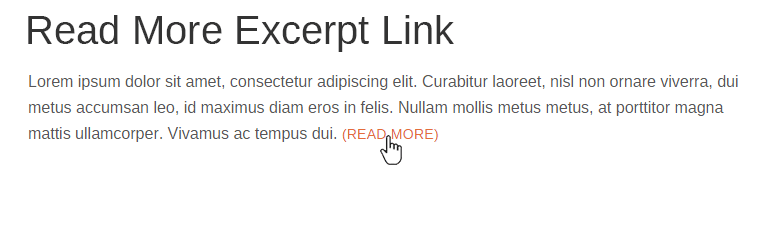
In the WordPress Settings menu, select the Read More Excerpt submenu, where you can modify the default Read More text link.
WordPress defaults to an excerpt length of 55 words. You can change this from the WordPress Settings menu, select the Read More Excerpt submenu where you can modify the excerpt word length.
Normally, WordPress doesn’t show a read more ellipsis if an excerpt is entered as part of the post. Also, WordPress doesn’t show the read more ellipsis if a read more tag is placed in the content before the set excerpt legnth (defaults to 55 words). To change this, from the WordPress Settings menu, select the Read More Excerpt submenu where you can active the Show More Frequently option. This will force the Read More to show whenever there’s post content.
Here’s a suggestion: a.read-more-link { font-size: 0.9em; text-transform: uppercase; display: inline-block; white-space: nowrap; } a.read-more-link:before { content: "("; } a.read-more-link:after { content: ")"; }
There’s also some over-zealous themes that re-write complete sections of WordPress code for no good reason. Elegant Themes is a good example of a theme company that makes highly bloated themes that re-write much of the WordPress normal operation. Basically, some themes totally ignore the perfectly working WordPress auto-excerpt and create their own. When themes do this, the Read More Excerpt plugin is ignored as the theme no longer calls the standard WordPress excerpt functions (which Read More Excerpt is hooked into). Other than making modifications to your theme, there’s nothing any plugin can do when themes don’t use the WordPress hooks and hard-code new functionality instead.
This is rare, but can happen when a theme is not strictly calling the get_the_excerpt() function but doing something with the result (like stripping HTML tags). If you know how to create a child of your template and make slight modifications to that child you can easily correct this. Start by looking at the theme’s archive.php file and following any get_template_part() calls from there. It’s best to not make changes directly to an off the shelf theme, as updates will override any changes you make. Creating a child theme is a better method of making changes to an off the shelf theme.

Ratings

5
6 reviews

Rating breakdown

Details Information

Version

1.4

First Released

10 Dec, 2015

Total Downloads

34,672

Wordpress Version

2.9.0 or higher

Tested up to:

4.9.12

Require PHP Version:

-

Tags

Contributors

Languages

The plugin hasn't been transalated in any language other than English.

DIRECTORY DISCLAIMER

The information provided in this THEME/PLUGIN DIRECTORY is made available for information purposes only, and intended to serve as a resource to enable visitors to select a relevant theme or plugin. wpSocket gives no warranty of any kind, express or implied with regard to the information, including without limitation any warranty that the particular theme or plugin that you select is qualified on your situation.

The information in the individual theme or plugin displayed in the Directory is provided by the owners and contributors themselves. wpSocket gives no warranty as to the accuracy of the information and will not be liable to you for any loss or damage suffered by you as a consequence of your reliance on the information.

Links to respective sites are offered to assist in accessing additional information. The links may be outdated or broken. Connect to outside sites at your own risk. The Theme/Plugin Directory does not endorse the content or accuracy of any listing or external website.

While information is made available, no guarantee is given that the details provided are correct, complete or up-to-date.

wpSocket is not related to the theme or plugin, and also not responsible and expressly disclaims all liability for, damages of any kind, arising out of the use, reference to, or reliance on, any information or business listed throughout our site.

Keep Leading Your Followers!
Share it for them.



