Plugin / Spin 360 deg and 3D Model Viewer
Maurice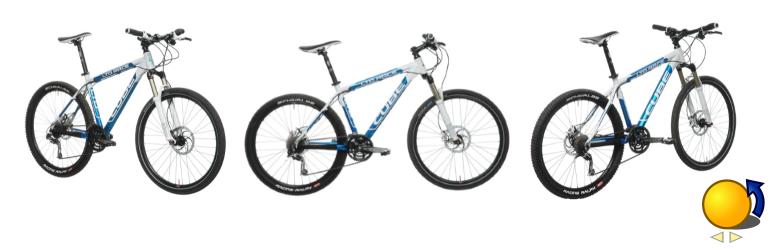
Installation
Installation
- Upload the plugin files to the
your_wordpress_plugins_dir/spin360directory, or Install as a regular WordPress plugin - Go your Plugins page via WordPress Dashboard and activate it
-
Use these shortcodes to post or page
[spin360 canvas_name="s1" imgs_folder="my_product/" imgs_nbr=100 aspect_ratio=1.33333 speed=1.0 loop=true]
[spin360 canvas_name="s1" imgs_folder="spin360demo/" imgs_nbr=48 aspect_ratio=1.33333]
[spin360 canvas_name="s1" imgs_folder="spin360demo/" imgs_nbr=100 autostart=false gesture=vertical]
[spin360 canvas_name="s1" imgs_folder="spin360demo/" imgs_nbr=36 hide_cmds=all]
defaults:
canvas_name="s1", aspect_ratio=1.33333, speed=-1.0, loop=true hide_cmds=zoom,fullscreenBe sure to use the HTML editor when inserting shortcodes!
check that your Quotation marks are exactly the correct symbol (Alt 34)
-
Use
jpgorpngimage files to display your model as a dynamic sequence;Name your images as following:
0001.jpg, 0002.jpg, ..., 0048.jpg (4 digits name)for
pngas following:0001.png, 0002.png, ..., 0048.png (4 digits name)and addimg_type=pngto your shortcodeNB
.jpgor.pngextension MUST be lowercase[spin360 canvas_name="s1" imgs_folder="spin360demo/" imgs_nbr=36 img_type=png]
for 3D models the image sequence can be generated using Blender turntable animation
upload your project image files in a
your_wordpress_uploads_dir/spin360showsubfolder(i.e
"your_wordpress_uploads_dir/spin360show/my_product/") via a standard FTP accessNB: for multisite add
/sites/#blog_id/to pathyour_wordpress_uploads_dir/sites/2/spin360show -
Modify the css style to adapt some features
- change
css/spin-style.cssto change some style aspect
- change
-
click to stop animation, click and hold to drag, double click to restart or invert sense of animation
Shortcode Parameters:
- canvas_name = canvas name needed in case of multiple shows on the same page (required)
- imgs_folder = folder of image sequence project; i.e.:
"spin360demo/"or"my_product"(required) -
imgs_nbr = any number > 1; i.e.: 100 image screenshots (required)
Note: name your images as following:
0001.jpg, 0002.jpg, ..., 0100.jpg (4 digits name)
or for png as following:0001.png, 0002.png, ..., 0100.png (4 digits name)and addimg_type=pngto your shortcode
Don’t mix up jpg with png image types on the same project folder. - speed = any number > 0.1 and < 10; i.e.: 1.5; Negative values will start the animation reversed
- aspect_ratio = any number i.e.: 1.3333 for 4/3 aspect ratio
- change
css/spin-style.cssto adapt some style aspect (as loading image or button font color) - loop = true or false (default is true)
- autostart = true or false (default is true) auto start the animation on load
- gesture = ‘horizontal’ (default) will make animation on mouse left/right movement; ‘vertical’ value will make animation on mouse up/dowm movement
- hide_cmds = all, fullscreen, reverse, zoom or false (default is false)
- button_color = ‘#00ABFF’ (default) HTML color values


Get Started With Free Trial
Explore the offer details: Discover it now



Ratings
Rating breakdown
Details Information
Version
First Released
Total Downloads
Wordpress Version
Tested up to:
Require PHP Version:
Tags
Contributors
Languages
The plugin hasn't been transalated in any language other than English.
DIRECTORY DISCLAIMER
The information provided in this THEME/PLUGIN DIRECTORY is made available for information purposes only, and intended to serve as a resource to enable visitors to select a relevant theme or plugin. wpSocket gives no warranty of any kind, express or implied with regard to the information, including without limitation any warranty that the particular theme or plugin that you select is qualified on your situation.
The information in the individual theme or plugin displayed in the Directory is provided by the owners and contributors themselves. wpSocket gives no warranty as to the accuracy of the information and will not be liable to you for any loss or damage suffered by you as a consequence of your reliance on the information.
Links to respective sites are offered to assist in accessing additional information. The links may be outdated or broken. Connect to outside sites at your own risk. The Theme/Plugin Directory does not endorse the content or accuracy of any listing or external website.
While information is made available, no guarantee is given that the details provided are correct, complete or up-to-date.
wpSocket is not related to the theme or plugin, and also not responsible and expressly disclaims all liability for, damages of any kind, arising out of the use, reference to, or reliance on, any information or business listed throughout our site.