Plugin / TinyMCE Advanced
Andrew Ozz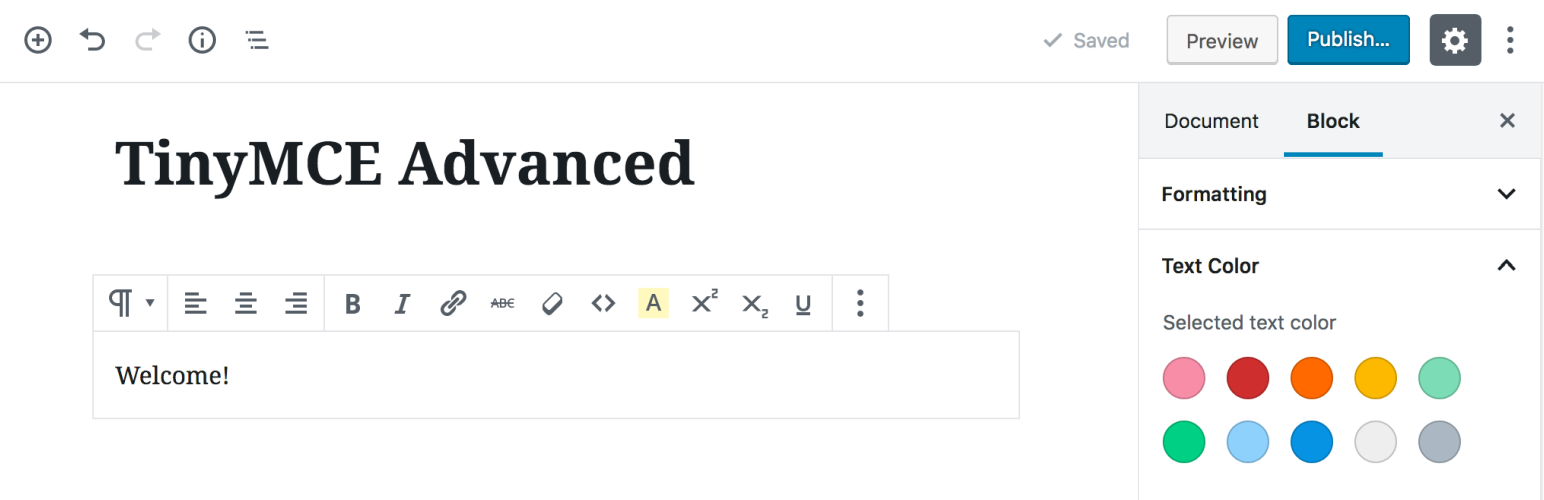
Changelog
Changelog
5.3.0
- Updated for WordPress 5.3 and TinyMCE 4.9.6.
5.2.1
- Updated for WordPress 5.2.1 and TinyMCE 4.9.4.
- Fixed resetting of the advanced options on update when all were unselected.
- Fixed and improved keepig of paragraph tags in the Classic block.
5.2.0
- Updated for WordPress 5.2.
- Updated the buttons settings for the block editor toolbar. There are a few new limitations there: most buttons are now hidden in a drop-down and the users are not allowed to arrange the buttons.
- Added a new advanced settings section for tables. Makes it possible to better configure how tables are edited and whether to disable use of inline CSS styles. Note that disabling inline styles would make the tables non-resizable in the editor.
- Removed the option to enable pasting of image sources in some browsers. It was not working correctly.
- Added a new option to always keep paragraph tags in the Classic Paragraph and Classic blocks in the block editor.
- Updated exporting and importing of the settings. Now settings are exported to a (downloaded) file, and can be restored by uploading a previously exported settings file.
- Improved the block editor Clear Formatting button. If some text is selected, it only clears the styling from that text. If no selection, all styling from the paragraph is cleared.
5.0.1
- Fixed importing of backed-up settings.
- Updated the FAQ section in the readme.
5.0.0
- Added several new buttons to the rich-text toolbar in the block editor.
- Added functionality to add, remove and arrange most buttons on the rich-text toolbar in the block editor.
- Added alternative location for buttons for the rich-text component. That lets users move buttons that are not used frequently out of the way.
- Added settings for selected text color and background color.
- Improved fixes and enhancements for the Classic block.
- Improved the Classic Paragraph block and added support for converting from most blocks to classic paragraphs, and converting a classic paragraph into separate blocks.
4.8.2
- Fixes and improvements for 4.8.1.
- Added separate option to enable the Classic Paragraph block.
- Added converting of most default blocks to classic paragraphs, and from classic paragraphs to default blocks.
4.8.1
- Updated for WordPress 5.0.
- Added Hybrid Mode for the block editor. Includes a Classic Paragraph block that replaces the default Paragraph block.
- Added option to replace the block editor with the classic editor.
- Added another settings section for configuring the toolbars in the Classic block and the Classic Paragraph block.
- Added some CSS fixed for the Classic block.
- Fixed (removed) setting of inline CSS for table cells when inserting a table. Inline CSS is still added when a table is resized by dragging.
4.8.0
- Updated for WordPress 4.9.8 and TinyMCE 4.8.0.
4.7.13
- Updated the table and anchor plugins to 4.7.13 (2018-05-16). Fixes a bug in the table plugin in Edge.
4.7.11
- Updated for WordPress 4.9.6 and TinyMCE 4.7.11.
4.6.7
- Fixed compatibility with Gutenberg freeform block.
- Forced refresh of the TinyMCE plugins after activation.
- Updated for WordPress 4.9 and TinyMCE 4.6.7.
4.6.3
- Updated for WordPress 4.8 and TinyMCE 4.6.3.
4.5.6
- Updated for WordPress 4.7.4 and TinyMCE 4.5.6.
- Fixed PHP notice after importing settings.
4.4.3
- Updated for WordPress 4.7 and TinyMCE 4.4.3.
- Fixed missing “Source code” button bug.
4.4.1
- Updated for WordPress 4.6 and TinyMCE 4.4.1.
- Fixed multisite saving bug.
- Added new button in the Text editor to add or reset the line breaks. Adds line breaks only between tags. Works only when it detects that line breaks are missing so it doesn’t reformat posts with removed paragraphs.
4.3.10.1
- Fixed adding paragraph tags when loading posts that were saved before turning
wpautopoff. - Disabled the (new) inline toolbar for tables as it was overlapping the table in some cases.
4.3.10
- Updated for WordPress 4.5.1 and TinyMCE 4.3.10.
- Fixed support for adding editor-style.css to themes that don’t have it.
4.3.8
- Updated for WordPress 4.5 and TinyMCE 4.3.8.
- Separated standard options and admin options.
- Added settings that can disable the plugin for the main editor, other editors in wp-admin or editors on the front-end.
- Korean translation by Josh Kim and Greek translation by Stathis Mellios.
4.2.8
- Updated for WordPress 4.4 and TinyMCE 4.2.8.
- Japanese translation by Manabu Miwa.
4.2.5
- Updated for WordPress 4.3.1 and TinyMCE 4.2.5.
- Fixed text domain and plugin headers.
4.2.3.1
- Fix error with removing the
textpatternplugin.
4.2.3
- Updated for WordPress 4.3 and TinyMCE 4.2.3.
- Removed the
textpatternplugin as WordPress 4.3 includes similar functionality by default. - French translation by Nicolas Schneider.
4.1.9
- Updated for WordPress 4.2 and TinyMCE 4.1.9.
- Fixed bugs with showing oEmbed previews when pasting an URL.
- Fixed bugs with getting the content from TinyMCE with line breaks.
4.1.7
- Updated for WordPress 4.1 and TinyMCE 4.1.7.
- Fixed bug where consecutive caption shortcodes may be split with an empty paragraph tag.
4.1.1
- Fix bug with image captions when wpautop is disabled.
- Add translation support to the settings page. Button names/descriptions are translated from JS using the existing WordPress translation, so this part of the settings page will be translated by default. The other text still needs separate translation.
4.1
- Updated for WordPress 4.0 and TinyMCE 4.1.
- Add the
textpatternplugin that supports some of the markdown syntax while typing, (more info). - Add the updated ‘table’ plugin that supports background and border color.
4.0.2
- Fix showing of the second, third and forth button rows when the Toolbar Toggle button is not used.
- Fix adding the
directionalityplugin when RTL or LTR button is selected. - Show the ”Advanced Options” to super admins on multisite installs.
- Add the
linkplugin including link rel setting. Replaces the Insert/Edit Link dialog when enabled. - Include updated ”table” plugin that has support for vertical align for cells.
4.0.1
Fix warnings on pages other than Edit Post. Update the description.
4.0
Updated for WordPress 3.9 and TinyMCE 4.0. Refreshed the settings screen. Added support for exporting and importing of the settings.
3.5.9.1
Updated for WordPress 3.8, fixed auto-embedding of single line URLs when not removing paragraph tags.
3.5.9
Updated for WordPress 3.7 and TinyMCE 3.5.9.
3.5.8
Updated for WordPress 3.5 and TinyMCE 3.5.8.
3.4.9
Updated for WordPress 3.4 and TinyMCE 3.4.9.
3.4.5.1
Fixed a bug preventing TinyMCE from importing CSS classes from editor-style.css.
3.4.5
Updated for WordPress 3.3 or later and TinyMCE 3.4.5.
3.4.2.1
Fix the removal of the media plugin so it does not require re-saving the settings.
3.4.2
Compatibility with WordPress 3.2 and TinyMCE 3.4.2, removed the options for support for iframe and HTML 5.0 elements as they are supported by default in WordPress 3.2, removed the media plugin as it is included by default.
3.3.9.1
Added advanced options: stop removing iframes, stop removing HTML 5.0 elements, moved the support for custom editor styles to editor-style.css in the current theme.
Attention: if you have a customized tadv-mce.css file and your theme doesn’t have editor-style.css, please download tadv-mce.css, rename it to editor-style.css and upload it to your current theme directory. Alternatively you can add there the editor-style.css from the Twenty Ten theme. If your theme has editor-style.css you can add any custom styles there.
3.3.9
Compatibility with WordPress 3.1 and TinyMCE 3.3.9, improved P and BR tags option.
3.2.7
Compatibility with WordPress 2.9 and TinyMCE 3.2.7, several minor bug fixes.
3.2.4
Compatibility with WordPress 2.8 and TinyMCE 3.2.4, minor bug fixes.
3.2
Compatibility with WordPress 2.7 and TinyMCE 3.2, minor bug fixes.
3.1
Compatibility with WordPress 2.6 and TinyMCE 3.1, keeps empty paragraphs when disabling the removal of P and BR tags, the buttons for MCImageManager and MCFileManager can be arranged (if installed).
3.0.1
Compatibility with WordPress 2.5.1 and TinyMCE 3.0.7, added option to disable the removal of P and BR tags when saving and in the HTML editor (wpautop), added two more buttons to the HTML editor: wpautop and undo, fixed the removal of non-default TinyMCE buttons.
3.0
Support for WordPress 2.5 and TinyMCE 3.0.
2.2
Deactivate/Uninstall option page, font size drop-down menu and other small changes.
2.1
Improved language selection, improved compatibility with WordPress 2.3 and TinyMCE 2.1.1.1, option to override some of the imported css classes and other small improvements and bugfixes.
2.0
Includes an admin page for arranging the TinyMCE toolbar buttons, easy installation, a lot of bugfixes, customized “Smilies” plugin that uses the built-in WordPress smilies, etc. The admin page uses jQuery and jQuery UI that lets you “drag and drop” the TinyMCE buttons to arrange your own toolbars and enables/disables the corresponding plugins depending on the used buttons.


Get Started With Free Trial
Explore the offer details: Discover it now



Ratings
Rating breakdown
Details Information
Version
First Released
Total Downloads
Wordpress Version
Tested up to:
Require PHP Version:
Tags
Contributors
Languages
DIRECTORY DISCLAIMER
The information provided in this THEME/PLUGIN DIRECTORY is made available for information purposes only, and intended to serve as a resource to enable visitors to select a relevant theme or plugin. wpSocket gives no warranty of any kind, express or implied with regard to the information, including without limitation any warranty that the particular theme or plugin that you select is qualified on your situation.
The information in the individual theme or plugin displayed in the Directory is provided by the owners and contributors themselves. wpSocket gives no warranty as to the accuracy of the information and will not be liable to you for any loss or damage suffered by you as a consequence of your reliance on the information.
Links to respective sites are offered to assist in accessing additional information. The links may be outdated or broken. Connect to outside sites at your own risk. The Theme/Plugin Directory does not endorse the content or accuracy of any listing or external website.
While information is made available, no guarantee is given that the details provided are correct, complete or up-to-date.
wpSocket is not related to the theme or plugin, and also not responsible and expressly disclaims all liability for, damages of any kind, arising out of the use, reference to, or reliance on, any information or business listed throughout our site.