Plugin / Weather Atlas Widget

Yu Media Group d.o.o.
Frequently Asked Questions (FAQ)

After the installation, activation and adding the widget (to the sidebar), click on “Weather Atlas Widget” on the right-hand side. Options for widget setup will become visible. (for issues and other questions please check plugin’s support forum)
The first option under widget’s options is a location. Just type the name of the city and choose a location from the drop-down. (for issues and other questions please check plugin’s support forum)
Please read “After activation” in Installation (for issues and other questions please check plugin’s support forum)
By placing “shortcode” in the article. Shortcode can be basic: [shortcode-weather-atlas city_selector=2372139] or with options: [shortcode-weather-atlas city_selector=2372139 layout=”horizontal” background_color=”#8224e3″ style=”float:right;width:200px” hourly=5 daily=0] (omitted options load default option value) In Admin panel “Appearance > Widgets”, basic shortcode (with city_selector) is generated when choosing a location. Below generated shortcode is a link “shortcode – all options” that shows all options for customizing weather widget. (for issues and other questions please check plugin’s support forum)
Beside standard options (font size, background, text color…) there is additional option – style (available only in shortcode). Just set desired inline style eg. style=”float:right;width:200px” in shortcode and widget will adopt this style as well. (for issues and other questions please check plugin’s support forum)
At first glance having a geolocation automatically choose location for a weather forecast is a better option, but this solution has a few flaws: 1. For this solution to function, users first have to be asked, and then they have to confirm, for browser to share their location. Even without discussing users’ privacy concerns, users are fed up with websites asking for permissions to allow web plugins to function (flash, silverlight…), permissions for browsers to send notifications, (infamous) cookies permissions, video ads permissions etc. Asking permission from user to allow browser to share their location is just one more nuisance that deteriorates site’s UX. In addition, users tend to ignore browser notifications in a same way they ignore ads. 2. Starting with Chrome 50 (released April 20 2016), Chrome browser no longer supports obtaining the user’s location using the HTML5 Geolocation API from pages delivered by non-secure connections. This means that the page that’s making the Geolocation API call must be served from a secure context such as HTTPS. In short – Chrome (with 58.4 percent of the browser market) allowes users’ geolocation only on HTTPS (less than 50%) websites. (and soon other browsers will follow same practice) 3. If geolocation is not possible, the fallback plan would be using visitors IP address to detect their location. This “plan B” is not so accurate. 4. Users can’t choose location other then their current location. Solution where users choose desired location from a drop-down is simple, reliable and understandable to users. (for issues and other questions please check plugin’s support forum)
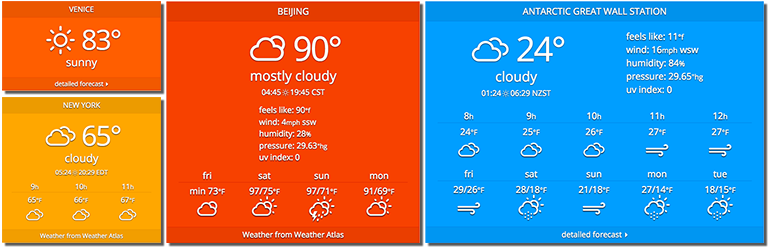
Yes. Placing multiple widgets (either in a sidebar or in content) on the same page is not a problem. Each widget and has individual options and “lives independently”. (for issues and other questions please check plugin’s support forum)
No. Widgets show cached weather data (stored in your database), and periodically update data from our service. (for issues and other questions please check plugin’s support forum)
The widget’s language is automatically chosen based on your Settings / General / Site Language settings. If a local translation does not exist, the fallback language is English. How to translate the widget to my language? You can quickly update local translation and adapt the widget to your preferred language. Procedure: 1. Find and update translation you need The translation you need is the same as your Admin panel / General / Site Language settings. 2. In your WP site, go to Admin panel / Dashboard / Updates, and check for updates. When your translation gets approved, you will see notice “New translations are available”. Choosing “Update Translations” will download and install your updated local translations and they will become visible on your site. (for issues and other questions please check plugin’s support forum)

Ratings

4.6
27 reviews

Rating breakdown

Details Information

Version

1.2.1

First Released

08 Jun, 2009

Total Downloads

50,500

Wordpress Version

4.0 or higher

Tested up to:

5.3

Require PHP Version:

-

Tags

Contributors

Languages

DIRECTORY DISCLAIMER

The information provided in this THEME/PLUGIN DIRECTORY is made available for information purposes only, and intended to serve as a resource to enable visitors to select a relevant theme or plugin. wpSocket gives no warranty of any kind, express or implied with regard to the information, including without limitation any warranty that the particular theme or plugin that you select is qualified on your situation.

The information in the individual theme or plugin displayed in the Directory is provided by the owners and contributors themselves. wpSocket gives no warranty as to the accuracy of the information and will not be liable to you for any loss or damage suffered by you as a consequence of your reliance on the information.

Links to respective sites are offered to assist in accessing additional information. The links may be outdated or broken. Connect to outside sites at your own risk. The Theme/Plugin Directory does not endorse the content or accuracy of any listing or external website.

While information is made available, no guarantee is given that the details provided are correct, complete or up-to-date.

wpSocket is not related to the theme or plugin, and also not responsible and expressly disclaims all liability for, damages of any kind, arising out of the use, reference to, or reliance on, any information or business listed throughout our site.

Keep Leading Your Followers!
Share it for them.



