Plugin / WoW Armory Character
Adam Cooper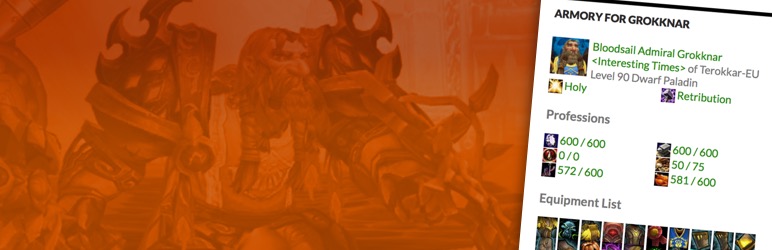
Installation
Installation
- Upload ‘wow-armory-character’ to the
/wp-content/plugins/directory - Ensure your webserver has write permissions to the
/wp-content/plugins/wow-armory-character/cachedirectory - Activate the plugin through the ‘Plugins’ menu in WordPress
- Configure a widget and add it to your site or use the
[armory-character]shortcode.
Shortcode Use
The shortcode can be added to any page or post and can be configured in an identical fashion to the
widget. At a minimum you will need to specify the realm and character name for it to work – though this will assume
that you wish to show all the details of character from the EU region in English.
[armory-character realm="Terokkar" name="Grokknar"]
The configuration parameters available to use are:
- region – EU, US, KO and TW currently supported
- show_portrait – 1 or 0
- show_title – 1 or 0
- show_talents – 1 or 0
- show_items – 1 or 0
- show_profs – This is a bitwise field. To get the setting you want add together the numbers below.
- 1 – Show profession badges
- 2 – Show secondary professions
- show_achievs – This is a bitwise field. To get the setting you want add together the numbers below.
- 1 – Show achievement bar
- 2 – Show achievement list
- 4 – Show descriptions on the achievement list.
- show_feed – This is a bitwise field. To get the setting you want add together the numbers below.
- 1 – Show items (loot).
- 2 – Show acheivements gained.
- 4 – Show acheivement criteria.
- 8 – Show icons next to each item.
- locale – en_GB, en_US, de_DE, es_ES, es_MX, fr_FR, it_IT, ru_RU, ko_KR, zh_TW or zh_CN
Note: Certain locale choices are only available when selecting some regions.
Available Filters
For more capable/adventurous developers there are a number of hooks that allow you to change the way the
plugin functions without altering its code. This means you get to upgrade in the future without worrying
about breaking any changes you may have made.
wow-armory-character-template
Allows you to specify an alternate template file to use to display your profile. Defaults to view-wow-armory-character.php
function my_function_name($file_path) {
  // e.g. return realpath(__FILE__) . '/view-wow-armory-character.php'
  return "THE_PATH_TO_YOUR_TEMPLATE_FILE";
}
add_filter('wow-armory-character-template','my_function_name');
wow-armory-character-display
Your profile once the template has been processed. It may be quicker to alter the display at runtime rather
than duplicate the template when making only minor changes. As well as the output that will be displayed
the Character data as retireved from the Community API is also passed. This should allow you to make any changes
you need.
function my_function_name($output, $character_data) {
  // Do something to the $output, perhaps using the $character_data
  return $output;
}
add_filter('wow-armory-character-display','my_function_name');
wow-armory-character-css
Allows you to specify an alternate stylesheet. This is the replacement for the tickbox provided in the administration
screen. You should now consider that option as deprecated and it will be removed in a future release.
The rationale behind this is that if you’re overriding the css completely you will have access to your theme to be able
to add this hook.
function my_function_name($file_path) {
  // e.g. return realpath(__FILE__) . '/wowcss.css'
  return "THE_PATH_TO_YOUR_CSS_FILE";
}
add_filter('wow-armory-character-css','my_function_name');


Get Started With Free Trial
Explore the offer details: Discover it now



Ratings
Rating breakdown
Details Information
DIRECTORY DISCLAIMER
The information provided in this THEME/PLUGIN DIRECTORY is made available for information purposes only, and intended to serve as a resource to enable visitors to select a relevant theme or plugin. wpSocket gives no warranty of any kind, express or implied with regard to the information, including without limitation any warranty that the particular theme or plugin that you select is qualified on your situation.
The information in the individual theme or plugin displayed in the Directory is provided by the owners and contributors themselves. wpSocket gives no warranty as to the accuracy of the information and will not be liable to you for any loss or damage suffered by you as a consequence of your reliance on the information.
Links to respective sites are offered to assist in accessing additional information. The links may be outdated or broken. Connect to outside sites at your own risk. The Theme/Plugin Directory does not endorse the content or accuracy of any listing or external website.
While information is made available, no guarantee is given that the details provided are correct, complete or up-to-date.
wpSocket is not related to the theme or plugin, and also not responsible and expressly disclaims all liability for, damages of any kind, arising out of the use, reference to, or reliance on, any information or business listed throughout our site.