Plugin / WPMovieLibrary

Charlie MERLAND
Frequently Asked Questions (FAQ)

Minimum Requirements WordPress 4.2 or greater PHP version 5.3 or greater (5.5 recommended) MySQL version 5.0 or greater Automatic installation The easiest Away to install WPMovieLibrary is to use the WordPress Extensions installer. Just log in to your WordPress dashboard, go to the Plugins page and hit “Add New”. In the search field type input “wpmovielibrary” and click “Install”. Easy! Manual installation Download the plugin from the WordPress.org Repository Unzip the plugin archive file Upload the plugin folder to the /wp-content/plugins/ directory Activate the plugin through the ‘Plugins’ menu in WordPress Use it!
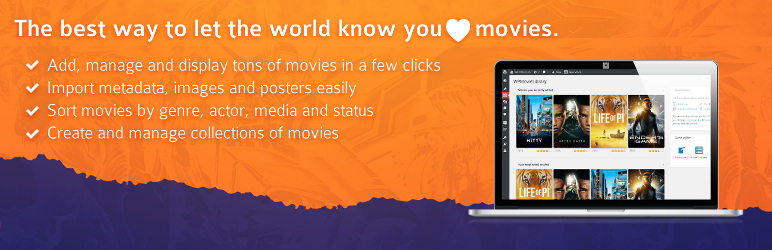
WordPress Movie Library is a plugin that helps you to create and manage your movie library.
You create/import movies like regular Posts/Pages. WPMovieLibrary provides various data related to your movies such as director, actors, genres, runtime, release date, production countries, budget… To help you sort your library efficiently. You have the possibility to affect specific, personal data to your movies: rating, media, status, language, subtitles… Using WPMovieLibrary you will fetch all you need to know about a movie in a single click, metadata as well as images and posters.
“Metadata” are generic data related to movies that are gathered from an external source, TheMovieDB API: directors, actors, genres… “Details”, on the other hand, are strictly personal and related to movies and most of all, you. How much you liked that movie (rating), how you own it / saw it (media), what’s your copy current state (status), in which languages/subtitles did you saw it / do you own it, etc.
Create a new Movie, input the movie title in search field below the content editor, hit “Search”. If your search brings multiple results you will be presented a list of possible matches, else all fields will be automatically filled and you movie’s poster automatically imported.
Use the import tool: simply paste a list of titles, all your movies will be created instantly. Now you can import metadata one-by-one or group the search, and then import directly the movies or add it to the queue for later final import.
Absolutely. Unlike most similar plugins, WPMovieLibrary uses TheMovieDB instead of IMDb due to the lack of proper official and legal API.
No, at least not directly. WPMovieLibrary uses TMDb only.
Because TMDb seemed (and still does) the more effective and easy-to-use API out there. It may not be as complete as IMDb or other, but it is very openly usable; IMDb is great but does not provide an official API, requiring to use a workaround like OMDb API; RottenTomatoes is great too, but has strict terms of use including a restriction to use in US only. TMDb terms of use and features suits us most, so that’s the one we use.
No you don’t. You can use your own TMDb API key for better results, but that is not required per se for WPMovieLibrary to work, the plugin can use its own API key if you don’t provide one.
Your theme/plugin/widget most likely doesn’t support Custom Post Types; open a thread in the support forum to get some help.
No. As its name implies, WPMovieLibrary is about managing a movie library, and was never meant to include TV Shows.
Not really, no. It would require a huge lot of work to adapt the plugin’s structure to TV Shows as it was built for movies only; we may develop a fork dedicated to TV Show, though, but that’s not quite soon as WPMovieLibrary is already taking a lot of your time right now.
Most likely they did not; if you’ve updated from a version 1.x your movies need to be updated to the new metadata format. You should be showed a notice in your dashboard informing you about this; if you’re not, ask us for support on WordPress.org Support so that we can help you fix this.

Ratings

4.8
53 reviews

Rating breakdown

Details Information

Version

2.1.4.7

First Released

23 Jun, 2014

Total Downloads

53,326

Wordpress Version

4.2 or higher

Tested up to:

4.8.11

Require PHP Version:

-

Tags

Contributors

Languages

The plugin hasn't been transalated in any language other than English.

DIRECTORY DISCLAIMER

The information provided in this THEME/PLUGIN DIRECTORY is made available for information purposes only, and intended to serve as a resource to enable visitors to select a relevant theme or plugin. wpSocket gives no warranty of any kind, express or implied with regard to the information, including without limitation any warranty that the particular theme or plugin that you select is qualified on your situation.

The information in the individual theme or plugin displayed in the Directory is provided by the owners and contributors themselves. wpSocket gives no warranty as to the accuracy of the information and will not be liable to you for any loss or damage suffered by you as a consequence of your reliance on the information.

Links to respective sites are offered to assist in accessing additional information. The links may be outdated or broken. Connect to outside sites at your own risk. The Theme/Plugin Directory does not endorse the content or accuracy of any listing or external website.

While information is made available, no guarantee is given that the details provided are correct, complete or up-to-date.

wpSocket is not related to the theme or plugin, and also not responsible and expressly disclaims all liability for, damages of any kind, arising out of the use, reference to, or reliance on, any information or business listed throughout our site.

Keep Leading Your Followers!
Share it for them.



