Plugin / YITH WooCommerce Category Accordion

YITH
Frequently Asked Questions (FAQ)

In order to import correctly the plugin strings in the new system, we had to change the text domain form ‘ywcca’ to ‘yith-woocommerce-category-accordion’. Once the plugin will be imported in the translate.wordpress.org system, the translations of other languages will be downloaded directly from WordPress, without using any .po and .mo files. Moreover, users will be able to participate in a more direct way to plugin translations, suggesting texts in their languages in the dedicated tab on translate.wordpress.org. During this transition step, .po and .mo files will be used as always, but in order to be recognized by WordPress, they will need to have a new nomenclature, renaming them in: yith-woocommerce-category-accordion-.po yith-woocommerce-category-accordion-.mo. For example, if your language files were named ywcca-en_GB.po and ywcca-en_GB.mo, you will just have to rename them respectively as yith-woocommerce-category-accordion-en_GB.po and yith-woocommerce-category-accordion-en_GB.mo.
Compatibility with all themes is impossible, because they are too many, but generally if themes are developed according to WordPress and WooCommerce guidelines, YITH plugins are compatible with them. Yet, we can grant compatibility with themes developed by YIThemes, because they are constantly updated and tested with our plugins. Sometimes, especially when new versions are released, it might only require some time for them to be all updated, but you can be sure that they will be tested and will be working in a few days.
If you have problems with our plugins or something is not working as it should, first follow this preliminary steps: Test the plugin with a WordPress default theme, to be sure that the error is not caused by the theme you are currently using. Deactivate all plugins you are using and check if the problem is still occurring. Ensure that you plugin version, your theme version and your WordPress and WooCommerce version (if required) are updated and that the problem you are experiencing has not already been solved in a later plugin update. If none of the previous listed actions helps you solve the problem, then, submit a ticket in the forum and describe your problem accurately, specify WordPress and WooCommerce versions you are using and any other information that might help us solve your problem as quickly as possible. Thanks!
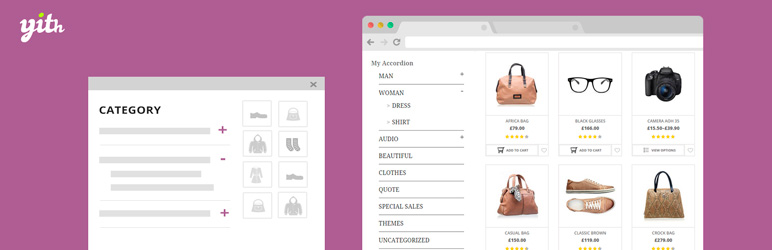
YITH WooCommerce Category Accordion will add a new submenu called “Category Accordion” in “YIT Plugins” menu. From there, you can configure all plugin settings. You will be able to add your accordion(s) in your sidebar thanks to a useful widget.

Ratings

2.5
20 reviews

Rating breakdown

Details Information

Version

1.0.31

First Released

18 Jun, 2015

Total Downloads

60,642

Wordpress Version

3.5.1 or higher

Tested up to:

5.3

Require PHP Version:

-

Tags

Contributors

Languages

DIRECTORY DISCLAIMER

The information provided in this THEME/PLUGIN DIRECTORY is made available for information purposes only, and intended to serve as a resource to enable visitors to select a relevant theme or plugin. wpSocket gives no warranty of any kind, express or implied with regard to the information, including without limitation any warranty that the particular theme or plugin that you select is qualified on your situation.

The information in the individual theme or plugin displayed in the Directory is provided by the owners and contributors themselves. wpSocket gives no warranty as to the accuracy of the information and will not be liable to you for any loss or damage suffered by you as a consequence of your reliance on the information.

Links to respective sites are offered to assist in accessing additional information. The links may be outdated or broken. Connect to outside sites at your own risk. The Theme/Plugin Directory does not endorse the content or accuracy of any listing or external website.

While information is made available, no guarantee is given that the details provided are correct, complete or up-to-date.

wpSocket is not related to the theme or plugin, and also not responsible and expressly disclaims all liability for, damages of any kind, arising out of the use, reference to, or reliance on, any information or business listed throughout our site.

Keep Leading Your Followers!
Share it for them.



